Last updated: 22 August 2026
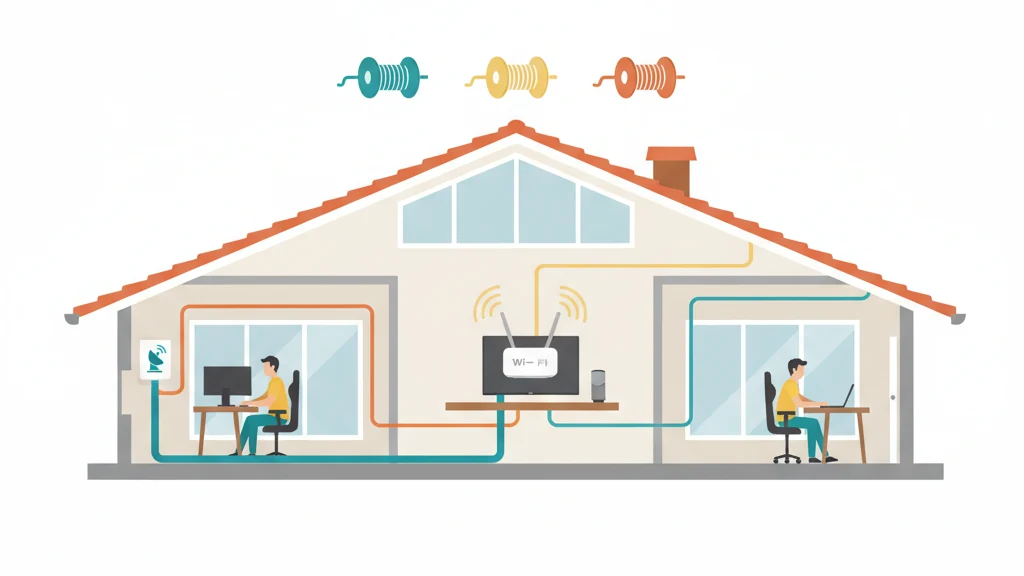
The short answer: an Ethernet cable can run up to 100 metres before signal quality starts to drop. For almost every Australian home NBN setup, that’s far more than you’ll ever need. The longest cable run in a typical house is 20 to 30 metres, and most are under 10. The thing to focus on is what type of cable to buy, not how far it’ll stretch.
For a normal NBN install, Cat 6 is the right cable. It’s cheap, it carries gigabit comfortably over your whole house, and it’s what Bunnings and JB Hi-Fi stock by default. Cat 6a is worth the small extra cost if you’re running cable through walls and want to future-proof for NBN 1000 or higher. Cat 5e is okay if you’re on NBN 100 or below. Cat 7 and Cat 8 are unnecessary in a home setting.
The 60-second version
| If you’re on… | Buy | Why |
|---|---|---|
| NBN 25 / NBN 50 | Cat 5e or Cat 6 | Either is fine; Cat 6 is barely more expensive |
| NBN 100 | Cat 6 | The default sweet spot |
| NBN 250 | Cat 6 or Cat 6a | Cat 6a if you’re running cable in-wall for future-proofing |
| NBN 1000 (gigabit) | Cat 6a | Cat 6 will work for short runs; Cat 6a is safer |
| Cable over 30 m or in-wall | Cat 6a, solid-conductor | Better margin for long runs and rigid behind walls |
| Over 100 m one cable | Use a switch midway, or fibre | 100 m is the hard physical limit per single run |
The 100-metre rule (in metric)
The IEEE 802.3 Ethernet standard caps a single cable run at 100 metres from end to end. That total includes the patch cable at each end (typically up to 5 metres each) plus the longer “horizontal run” in between (up to 90 metres). Beyond 100 metres in one segment, the signal degrades enough to drop packets and reduce speed.
This isn’t a rule you’ll bump into in a normal Australian home. The typical longest run inside a house is maybe 15 to 25 metres. NBN connection box on one external wall, router somewhere central, devices in nearby rooms. Even running cable from a granny flat at the back of a 600-square-metre block to the main house is well under 100 metres.
The scenarios where 100 metres actually becomes a constraint:
- Rural blocks where you’re running cable from a shed or workshop to a main house several hundred metres away
- Office or warehouse spaces with long straight runs
- Large multi-storey buildings where one cable would need to cover multiple floors plus horizontal distance
If you’re hitting the 100-metre limit, the fix is to install a network switch somewhere along the run. Every switch effectively gives you another 100 metres because it regenerates the signal. Two cables of 80 metres each with a switch in between is fine; one cable of 160 metres is not.
The cable categories explained
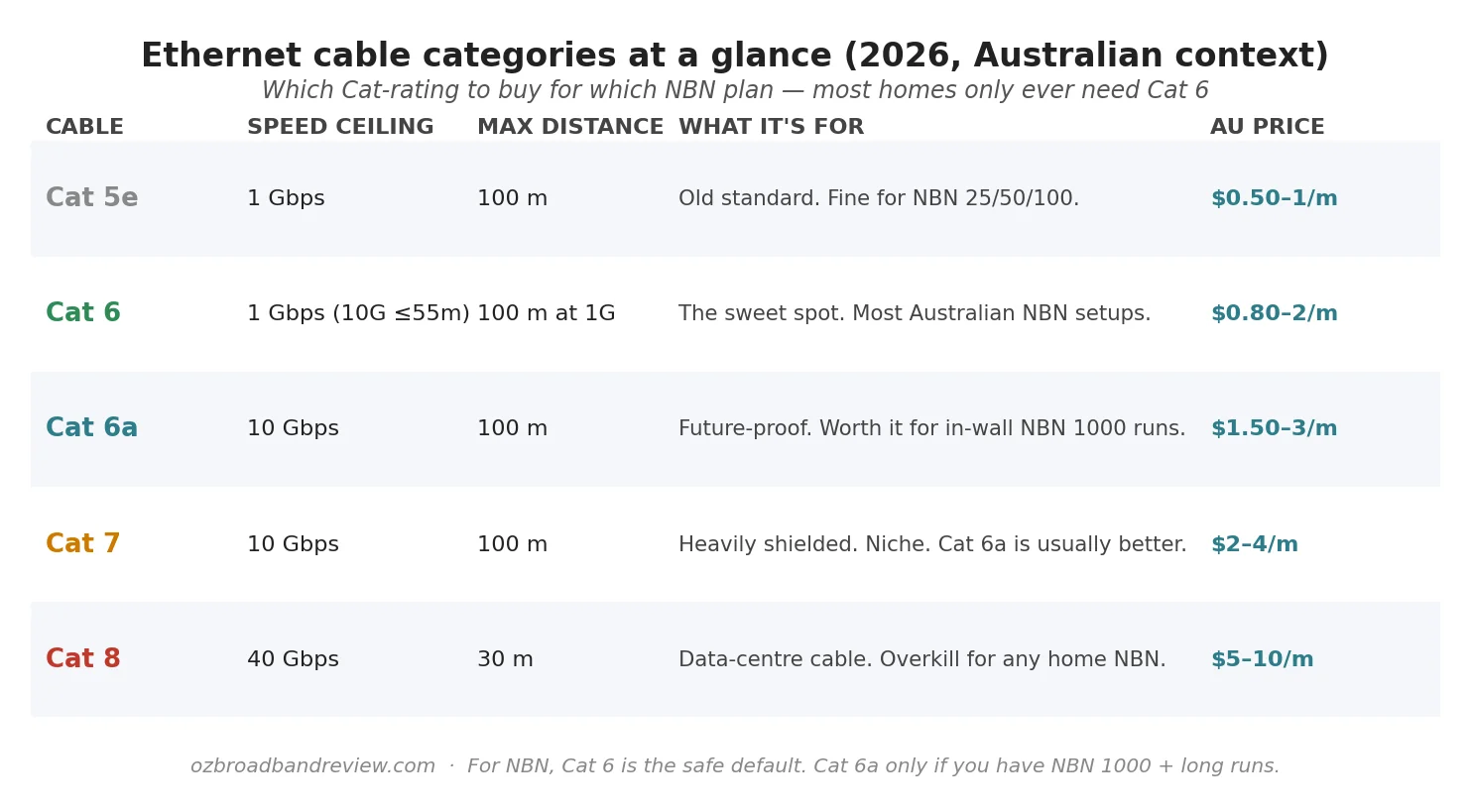
Cat 5e (old standard, still works)
Cat 5e cable handles gigabit Ethernet (1 Gbps) over the full 100 metres. If you’ve already got Cat 5e in the walls from when the house was built, leave it there. There’s no benefit to ripping it out for NBN 100 or NBN 50. Cat 5e is also still on sale at Bunnings and Officeworks, usually a few dollars cheaper than Cat 6 per metre.
Cat 6 (the default for new installs)
Cat 6 is what to buy if you’re starting fresh. It handles gigabit over 100 metres easily, and can do 10 Gbps for short runs (up to about 55 metres) which gives you headroom if you ever upgrade to NBN 1000 or higher. Cat 6 patch cables at JB Hi-Fi or Officeworks run $10 to $25 for typical lengths (1 to 10 metres). Bulk cable for in-wall runs is roughly $1 to $2 per metre.
Cat 6a (future-proof for in-wall)
Cat 6a runs 10 Gbps over the full 100 metres. If you’re hiring an electrician to run cable through your walls, Cat 6a is worth the small price difference. You don’t want to be doing this again in five years when NBN 2000 becomes standard. For surface run patch cables on visible runs, Cat 6 is fine; the upgrade to Cat 6a only really matters for long, permanent installations.
Cat 7 (niche, usually skip it)
Cat 7 has the same speed ceiling as Cat 6a (10 Gbps over 100 m) but adds heavier shielding. The shielding is useful in environments with strong electromagnetic interference. Industrial sites, server rooms, near big motors. For a home NBN setup, Cat 7 is overkill, costs more than Cat 6a, and offers nothing useful.
Cat 8 (data centre cable, never needed at home)
Cat 8 handles 40 Gbps but only over short runs (30 metres). It’s designed for data centres connecting switches to servers. The cable is thick, expensive ($5 to $10 per metre), and offers literally zero benefit for any home NBN plan. If a retailer is recommending Cat 8 for your home, they’re upselling.
Typical cable runs in an Australian home
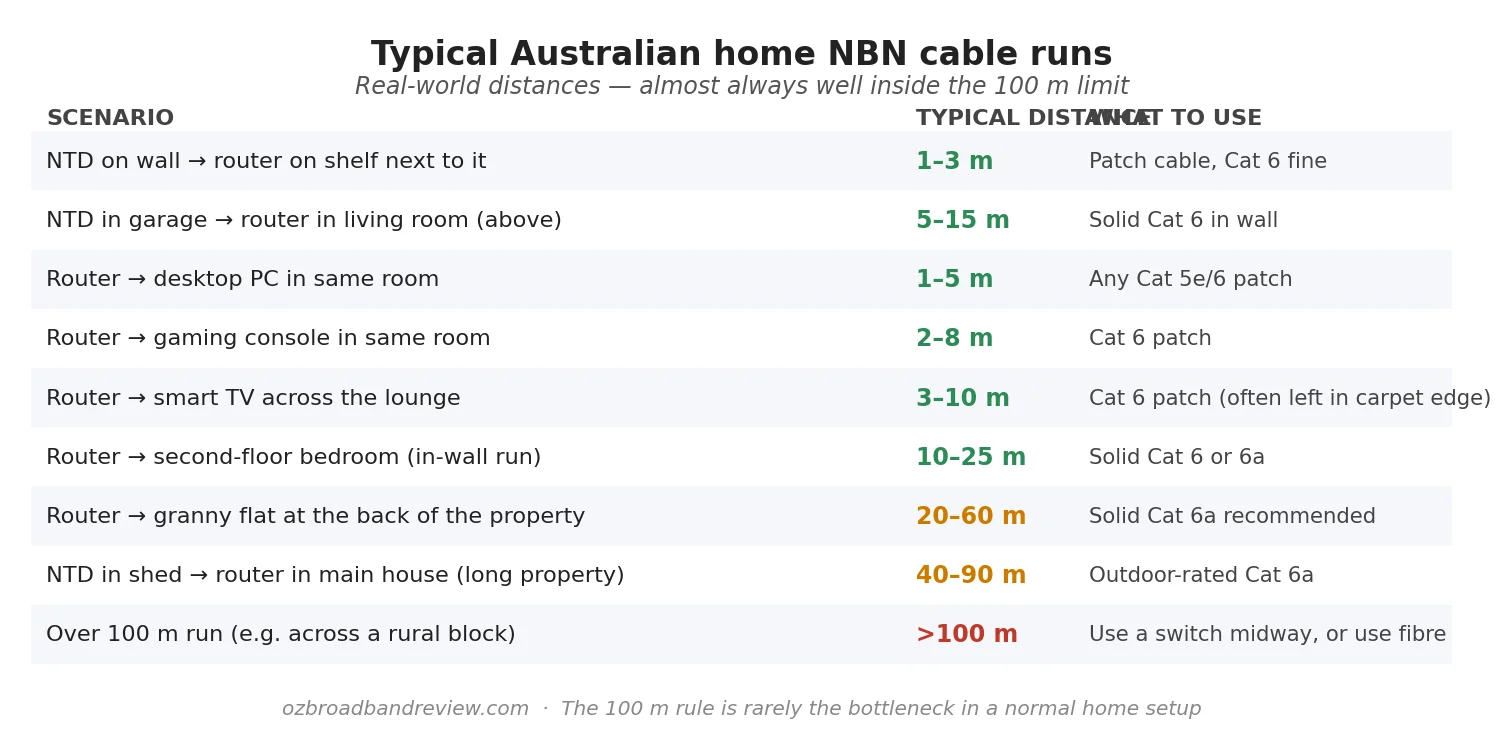
The most common cable run in any house is the one from the NBN connection box (the white plastic box mounted on a wall somewhere) to your router. Sometimes that’s 30 cm (router sitting on a shelf right next to it). Sometimes it’s 15 metres (NBN box in the garage, router in the living room above). Either way it’s well inside the limit.
The other runs people often miss when planning a setup:
- Router → desktop PC or gaming console in the same room. Usually under 5 metres. Any Cat 5e or Cat 6 patch cable works.
- Router → smart TV across the lounge. Typically 3 to 10 metres. A Cat 6 patch cable run along the skirting board is the cleanest fix.
- Router → second-floor bedroom. 10 to 25 metres through walls. This is where you’d hire a sparky to run solid Cat 6 (or Cat 6a) properly behind the plaster.
- Router → access point in the back of the house. 5 to 20 metres. Cat 6 to a PoE-capable AP gives you a wired-quality Wi-Fi signal at the other end.
If your router placement is the limiting factor, consider whether the NBN box can be relocated. BYO modem setup for NBN covers the basics of repositioning the modem during install.
Patch cable vs solid-conductor: what’s the difference?
The Ethernet cable you buy off the shelf at JB Hi-Fi in 1-, 2-, 5- or 10-metre lengths is “patch” cable, also called “stranded” because the conductors inside are made of multiple thin wires twisted together. Patch cable is flexible and bends well, but it loses signal over longer distances and isn’t designed to be terminated repeatedly.
The cable an electrician will run through your walls is “solid-conductor” cable. Each conductor is a single thicker copper wire, which carries signal further with less loss and crimps into wall plates and panels properly. Solid cable is more rigid and harder to bend tightly, so it’s a poor choice for short runs to devices on a desk.
The rule:
- Short visible run from router to a device. Buy a pre-made patch cable
- In-wall, in-ceiling or under-floor run. Get solid-conductor cable, ideally fire-rated for in-wall use, and have it professionally terminated
Power-over-Ethernet (PoE): runs the same length rule
Power over Ethernet sends both data and power down the same cable, which is handy for security cameras, smart-home access points and IP phones that need both. PoE follows the same 100-metre rule. A single PoE cable can run up to 100 metres, but the power available at the far end drops a little with distance.
For typical home NBN setups, PoE is mainly relevant if you’re putting a Wi-Fi access point or a security camera somewhere away from a power point. Cat 6 or Cat 6a both handle PoE fine.
Buying Ethernet cable in Australia
Where to buy in 2026:
- Bunnings. Cat 6 patch cables in 1 to 10 metre lengths, plus bulk Cat 6 cable on reels. Best value for short straight-up patch needs.
- JB Hi-Fi / Officeworks. Branded Cat 6 / Cat 6a patch cables. Slightly more expensive than Bunnings but more selection (flat cables, coloured cables, longer lengths).
- Online (eBay, Kogan, Amazon AU). Best for bulk cable rolls (305 m boxes) at $80 to $200 depending on category. Useful if you’re running cable through walls.
- Trade suppliers (e.g. L&H Electrical, Rexel). What sparkies use. Cat 6 / Cat 6a in 305 m boxes, with proper TPS-style approval for in-wall runs.
What to avoid:
- “Cat 7” or “Cat 8” cable being upsold for a normal home: unnecessary, more expensive, no benefit
- CCA (copper-clad aluminium) cable. Sometimes sold cheap online, fails over distance and isn’t compliant with PoE standards. Avoid. Look for “100% copper” or “OFC” on the label.
- Pre-made cables longer than 30 metres. The quality control on cheap long pre-made cables is poor. For runs over 15 metres, get solid cable cut to length and crimped, or have an installer run it
Frequently asked questions
What is the maximum length of an Ethernet cable?
100 metres for a single cable run, end to end. That total includes the patch cables at each end plus the longer horizontal run in between. Beyond 100 metres, signal quality drops and packets start to fail. To go further, install a network switch midway. Every switch effectively gives you another 100 metres of reach.
What ethernet cable do I need for NBN?
For most Australian NBN homes, Cat 6 is the right choice. It handles gigabit speeds over the full 100 metres and is cheap enough to use everywhere. If you’re on NBN 25 or 50, Cat 5e is also fine. If you’re running cable through walls and want to future-proof for NBN 1000 or NBN 2000, step up to Cat 6a. Skip Cat 7 and Cat 8. They’re not useful for home NBN setups.
Is Cat 6 good enough for NBN 1000?
Yes, for short runs. Cat 6 can carry 10 Gbps over distances up to about 55 metres, so a Cat 6 patch cable from your router to a device in the same room is fine for NBN 1000. For longer in-wall runs at gigabit and above speeds, Cat 6a is the safer choice because it’s certified for the full 100 metres at 10 Gbps.
Can I use a long ethernet cable from my NBN box to my router?
Yes, up to 100 metres in a single run. Almost any house plan will be well under that. If your NBN box is in a garage or a study cupboard and you want the router somewhere more central, you can run a 10 to 25 metre Cat 6 cable to relocate it without losing any speed. Solid-conductor Cat 6 is the right cable type for in-wall runs.
What’s the difference between Cat 6 and Cat 6a?
Both handle gigabit Ethernet (1 Gbps) over the full 100 metres without issue. Cat 6a is certified for 10 Gbps at the full 100 metres; Cat 6 can do 10 Gbps but only for shorter runs (about 55 metres). Cat 6a has thicker conductors and tighter twist for better long-distance performance. For most home NBN setups, Cat 6 is enough. Cat 6a is the future-proofing choice for in-wall installs.
How can I extend Ethernet beyond 100 metres?
Three options. A network switch midway acts as a signal regenerator. Every switch resets the 100-metre limit, so two 80-metre runs with a switch in between are fine. A media converter pair converts Ethernet to optical fibre and back, with no practical distance limit. For typical home use a midway switch is the simplest fix; for rural blocks running cable across a property, fibre is the proper solution.
Should I buy a flat or round Ethernet cable?
Cosmetic preference more than anything. Flat cables sit flush along skirting boards and slide under carpets better; round cables are more flexible and easier to coil. Both perform the same electrically. Pick whichever physically fits the room. There’s no quality difference for the same Cat rating.
Do I need shielded Ethernet cable at home?
No. Shielded cable (Cat 6a STP, Cat 7) is for environments with heavy electromagnetic interference. Industrial settings, near large motors, in server rooms with hundreds of cables bundled together. A normal Australian home has no meaningful EMI sources that affect Ethernet, so unshielded UTP cable is fine and cheaper.
Why is my wired speed slower than my plan speed?
If your wired Ethernet speed is well below your plan’s speed cap, the cable is rarely the cause. More common: a Wi-Fi-bridged section in the middle (an extender or mesh node), a slow port on your router (some routers have one gigabit port and the rest at 100 Mbps), or a device that can’t sustain gigabit (older laptops). Confirm by running a speed test on Ethernet directly into the router. We’ve got more on this in internet speed tests explained.
Where can I buy Ethernet cable in Australia?
Bunnings, JB Hi-Fi, Officeworks, Kogan and Amazon AU all stock patch cables. For bulk solid-conductor cable on a 305-metre reel (needed for in-wall installs), online retailers like Kogan or trade suppliers like L&H Electrical and Rexel are cheaper than Bunnings. Always look for “100% copper” or “OFC” on the label. Avoid CCA (copper clad aluminium) cable, which is sometimes sold cheaply online and degrades over distance.