Last updated: 22 August 2026
If your NBN has just dropped out, or keeps dropping out, the answer is almost always one of five things: an outage on the network, a power glitch in your NBN box or router, a copper or cable fault inside the wall, a problem with your provider’s authentication, or your home Wi-Fi (which feels like an NBN problem but isn’t). This is also how you troubleshoot NBN dropouts, whether the connection cuts out for a few seconds at a time or stays down for hours. This guide walks through how to work out which one it is in about 15 minutes, what to say when you call your provider, and what to do if you’re still offline two days later.
I’ll keep it practical. If you want the quick version, here it is:
- Check whether there’s an outage on your address (link below).
- Look at the lights on your NBN box. Each colour means something specific (full table further down).
- Power-cycle the box and the router, in that order, and wait 15 minutes.
- Plug a laptop straight into the box with an Ethernet cable to rule out your Wi-Fi.
- If it’s still dead, ring your provider with the light colours, your account number, and what you’ve already tried.
- If the ticket isn’t resolved in 48 hours, escalate. If it’s still not fixed after 14 days, the Telecommunications Industry Ombudsman is free and surprisingly effective.
While you’re waiting on a fix, mobile data tethering or a 4G/5G backup modem will keep you online. The “Stay online while you wait” section covers that properly.
Step 1: Is it actually an outage?
Before you touch any cables, find out whether NBN Co or your provider is already aware of a problem in your area. A surprising number of “broken NBN” calls turn out to be a planned maintenance window or a tower outage that’s affecting hundreds of premises at once. If that’s the case, no amount of router restarting will fix it.
The fastest checks, in order of usefulness:
- NBN Co’s official network status page at nbnco.com.au/support/network-status. Put in your address. This is the source of truth. If NBN Co says your area is affected, your provider can’t fix it for you.
- Your provider’s status page. Telstra, Optus, Aussie Broadband, TPG, iiNet, Superloop and most others have one. They usually catch issues a bit faster than NBN Co’s because providers see customer-side errors before NBN escalates them.
- DownDetector at downdetector.com.au. This is crowd-reported. If your provider’s chart suddenly spikes, you’re not alone and they probably already know about it.
We’ve written a more detailed guide on this if you want the full walkthrough: how to check NBN outages in Australia. For the rest of this article I’ll assume you’ve checked and there’s no known outage, so the problem is something at your end.
Step 2: Read the lights on your NBN box
The single most useful thing you can do before calling your provider is work out what colour the lights on your NBN box are showing. Different connection types use different boxes, and the same colour means different things on each one. A red optical light on an FTTP box is a fibre fault. A red light on an HFC box is something completely different.
If you’re not sure what NBN connection type you have, your bill will say, or you can look it up at NBN Co’s address checker. We have a full explainer at different types of NBN connections.
Here’s a quick reference for what to look for on each box type. Find your connection type along the top, then your light state down the left:
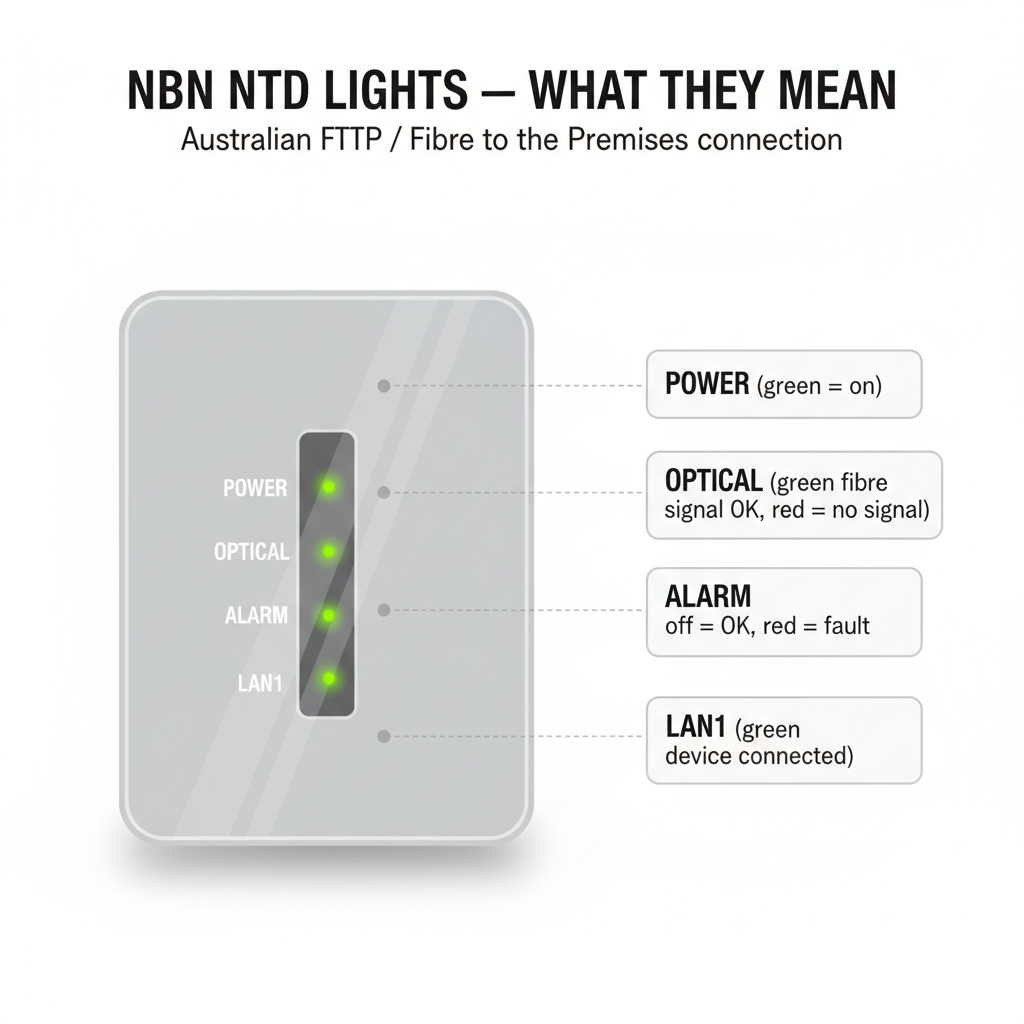
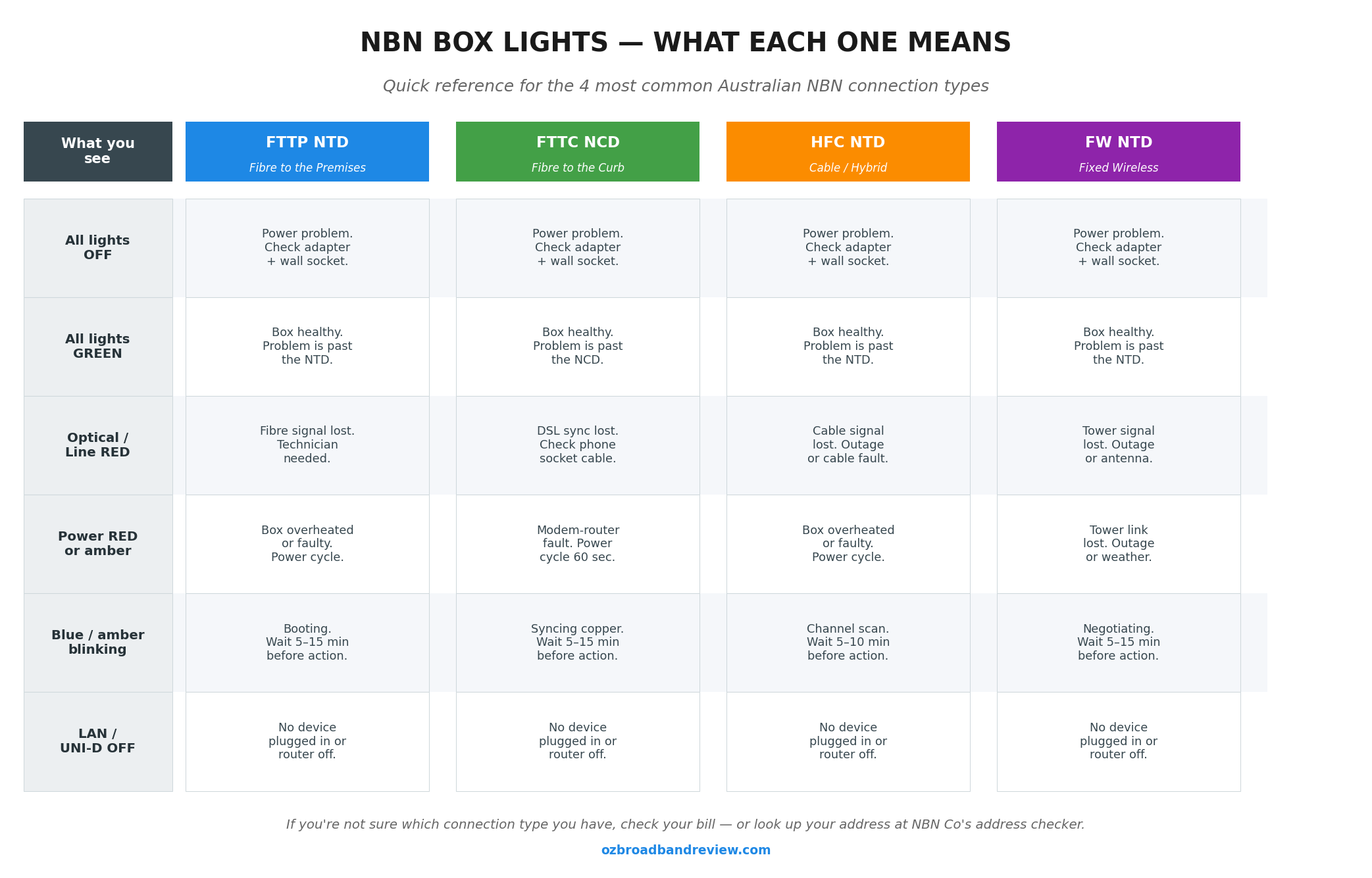
A few rules of thumb that apply across all box types:
- All lights off almost always means a power problem. Check the power adapter is plugged in at both ends and the wall switch is on. If the box is on a power board, swap it onto the wall directly.
- A solid red anywhere usually points to a fault that needs a technician. Note which light is red before calling.
- A blinking blue or amber usually means the box is starting up or syncing. Give it 15 to 20 minutes before you decide it’s actually broken. FTTP NTDs in particular can take a surprisingly long time to come back after a power blip.
- All green means the box thinks it’s healthy. If you’re still offline with all-green lights, the problem is past the NBN box: your router, your provider’s authentication, or your Wi-Fi.
Write the colours down or take a photo. You’ll need this in step 4 when you ring your provider.
Step 3: Restart, then isolate the problem
If the lights look basically OK but the internet still isn’t working, the next move is the boring but effective one: power-cycle everything in the right order, then strip the home network back to a single device so you know what you’re actually testing.
The right way to restart
Order matters. Doing it backwards is one of the most common reasons people end up back on the phone an hour later.
- Unplug both the NBN box and the router (or your modem-router combo) from power.
- Wait 60 seconds. Don’t skip this step. The box has internal capacitors and you want them fully discharged.
- Power the NBN box back on first. Wait until its lights settle into their normal pattern. On FTTP this is roughly 5 minutes. On FTTN it can be 10 to 15.
- Power the router back on. Give it 2 to 3 minutes to authenticate with your provider.
- Try the internet. Don’t just check Wi-Fi; open a website on a device you know was working before.
If you’ve got a modem-router combo (one box, no separate NBN box, common on FTTC/FTTN/HFC), there’s just the one device to restart. Same 60 second wait, same 5 to 10 minute warm-up.
Isolate the problem with a wired test
This is the step most people skip and it’s the most useful. Plug a laptop straight into your router (or NBN box, if you’ve got an FTTP NTD with a UNI-D port) using an Ethernet cable. Turn the laptop’s Wi-Fi off so it can’t fall back to a phone hotspot. Try to open a website.
- If wired works but Wi-Fi doesn’t, the problem is your Wi-Fi, not your NBN. Head over to our slow Wi-Fi guide. Usually it’s interference, an old router, or distance.
- If wired also doesn’t work but the NBN box lights are all green, your provider can’t authenticate you. This is something only they can fix. Skip to step 4.
- If wired works but it’s slower than your plan should be, run a speed test and compare it to what you’re paying for. We’d rather you used our speed test because it logs Australian results back to us and helps everyone, but Ookla, Fast.com and your provider’s own test are all fine.
Step 4: Call your provider (and what to have ready)
If you’ve gone through the first three steps and you’re still offline, it’s time to ring your provider. The single biggest thing that determines how quickly your fault gets logged is whether you turn up to the call with the right information. Phone agents have a script. Give them what they’re going to ask for upfront and you’ll save 20 minutes.
What to have ready before you call
- Your account number. On your last bill or in your provider’s app.
- Your NBN connection type. FTTP, FTTC, FTTN, HFC, Fixed Wireless or Sky Muster. Different fault paths, different teams.
- The light pattern on your NBN box. Specifically: which light, what colour, solid or blinking. A photo on your phone is fine.
- When it stopped working. Time and date. Has it happened before? Does it happen at the same time of day?
- What you’ve already tried. “I’ve restarted both boxes and tested with a laptop directly into the router via Ethernet.” This skips the first 10 minutes of their script.
- Any error messages. From the router’s admin page, your computer, or any apps that have failed.
Provider phone numbers
Rather than re-type a directory that goes out of date, here’s the live one we keep updated:
For more on what to expect when you call and how to escalate if the front-line agent can’t help, our full NBN contact number guide walks through it.
What happens after you log the fault
Most providers will run a remote line test while you’re on the call. If they can’t see your service at all, they’ll usually raise an NBN Co ticket on your behalf and book a technician visit if needed. Standard turnaround is 1 to 3 business days. NBN Co technicians work between 8am and 5pm on weekdays and Saturday mornings, and they need someone over 18 home for the appointment.
Get a ticket reference number before you hang up. Without it, you’re starting from scratch every time you ring back.
If it’s still not fixed: escalate
If your fault is still open after 48 hours with no genuine progress, ring back and ask for the issue to be escalated to a Tier 2 or specialist team. Reference your original ticket number. Be polite but firm. The front-line script will keep cycling you back through restart the modem if you let it.
If you’re still offline after 14 days, you can lodge a complaint with the Telecommunications Industry Ombudsman (TIO). It’s free, it’s a statutory body, and it works. The simple act of telling your provider you’re lodging with the TIO will, in my experience, usually get the issue bumped to someone who can actually fix it within a day or two. You can also claim compensation through the TIO process. Extended outages of more than a few days are eligible.
Whirlpool forum threads are full of stories of people getting refunds for partial month outages once they raised a TIO ticket. One I read recently: a user in regional Victoria was out for 11 days waiting on a fibre tail repair, got fobbed off three times, lodged with the TIO, and had it fixed within 36 hours plus a $90 credit. The TIO isn’t magic but it’s the only escalation path that genuinely outranks your provider’s call centre.
Step 5: Stay online while you wait
If your fault is going to take a few days to fix, you’ve got three realistic options for staying connected. None are free, but they’re all better than being unable to work.
Tether off your phone
The fastest option. Every modern Australian phone plan from Telstra, Optus, Vodafone and the prepaid resellers includes a “personal hotspot” feature that turns your phone into a Wi-Fi access point. Most plans treat hotspot data the same as regular data, so you’re using your monthly allowance.
To make it through a day or two on tethering without burning your data cap:
- Drop streaming services to standard definition. Netflix in SD uses about 1 GB an hour vs 7 GB for 4K.
- Pause OneDrive, iCloud, Google Photos and Dropbox sync while you’re tethered.
- Turn off auto-updates on Windows, macOS and Steam.
- If you’re going to run out, most providers sell a one off data top up. Telstra and Optus both offer 5 to 10 GB add-ons for around $10 to $15.
4G/5G home wireless as a backup
If you’re going to be down for longer than a couple of days, or this is the second or third outage in a year, it’s worth considering a 4G or 5G home wireless plan as a permanent backup. Plans start at around $54.99/month with TPG and go up to $94/month for Optus uncapped 5G. Most are no contract, so you can cancel the day your NBN comes back if you want.
A few providers now include automatic 4G failover built into their modem. Aussie Broadband’s HFC and FTTC plans, and Telstra’s Smart Modem range, will switch to a backup 4G connection within seconds of detecting an outage. That’s worth knowing about when you’re choosing your next plan.
We’ve got a longer look at this in our 5G home internet guide and mobile broadband guide.
Free Wi-Fi as a stopgap
For anything urgent that can’t wait, most council libraries in Australia have free Wi-Fi, no purchase required, and decent enough speeds for video calls. Westfield centres, McDonald’s and most cafes also offer free Wi-Fi but it’s slower and less reliable. Don’t log into your bank on public Wi-Fi.
Thinking it’s time to switch providers?
If your current provider has handled the outage badly, long hold times, no proactive updates, or the same fault keeps coming back, switching is usually easier than people think. There’s no break-in service on most NBN connection changes, and a lot of providers have month-to-month plans now.
If reliability is the main thing you care about, here are the affiliate plans we’re currently tracking that have strong reliability records:
For a complete walkthrough on switching without going offline in the gap, see our step-by-step guide to switching NBN providers.
How to reduce the chance of next time
You can’t stop the NBN going down, but you can make recovery easier and you can avoid a chunk of the self-inflicted outages people deal with.
- Put the NBN box and router on a surge protector. A $30 power board with surge protection will save you from a storm taking out your NBN equipment, the NBN box especially; replacements aren’t covered if it’s user damage.
- Keep the equipment somewhere cool and ventilated. Modems run hot and heat kills them. Don’t shut your router in a cupboard with no airflow.
- Update your router firmware occasionally. Most routers have an auto-update setting buried in the admin page; turn it on. We’ve got a guide on checking router firmware if you want to do it manually.
- Keep your provider’s app installed on your phone. Most providers’ apps will tell you about outages on your address before the call centre will, and you can log a fault from the app without sitting on hold.
- Have a backup plan. Even just knowing the password for your phone’s hotspot and where the nearest free Wi-Fi is means you’re not scrambling at 8am on a Monday when the NBN drops.
Related guides on the site
- How to check NBN outages in Australia: the dedicated outage-check guide
- What is the NBN box?: covers all 6 NBN box types in detail
- Slow Wi-Fi? 10 fixes that actually work: if the wired test in Step 3 worked but Wi-Fi is the problem
- How to switch NBN providers without disruption: if you’re considering a switch
- The full NBN FAQ: answers to most other common NBN questions
FAQs
Why has my NBN suddenly stopped working?
The most common causes, in rough order of frequency: an outage on the NBN network or your provider’s side, a power glitch that’s confused the NBN box or router (a 60-second power-cycle usually fixes this), a copper or fibre fault from a recent storm, your provider’s authentication failing after a plan change or invoice issue, or a problem with your home Wi-Fi rather than the NBN itself. Step through the five steps above to work out which one it is.
What does the red light on my NBN box mean?
It depends which light is red and which connection type you have. On an FTTP NTD, a red optical light usually means the fibre signal isn’t being received and a technician visit is likely needed. On an HFC NTD, a red US/DS light means the cable connection is down. On FTTC, a red light on the NCD means it’s not seeing the curb side distribution point. In all cases, write down which light is red before calling your provider. The colour and position is what they’re going to ask first.
How long does it take to fix an NBN fault?
Standard turnaround for a logged fault is 1 to 3 business days. Faults that need a technician site visit add another 1 to 2 days on top. Major outages affecting multiple premises usually get fixed faster because they’re prioritised. If you’re at 48 hours with no progress, escalate inside your provider. If you’re at 14 days, take it to the TIO.
How do I troubleshoot NBN dropouts?
Work through the same five steps whether the NBN is fully down or just cutting out repeatedly: check NBN Co’s outage map for your address, read the lights on your NBN box, power-cycle the box then the router and wait for them to settle, plug a laptop straight into the box with an Ethernet cable to rule out Wi-Fi, then call your provider with the light colours and what you’ve already tried. If the dropouts happen at a predictable time each evening, congestion is the more likely cause; see the next question.
Why does my NBN keep dropping out at the same time every day?
If it’s the same time of day, it’s almost always congestion, either your provider over-subscribing their CVC capacity, or a fixed wireless tower with too many users. Evening dropouts between 7pm and 11pm are the classic symptom. The fix is either switching to a provider with better rated peak speeds (Aussie Broadband, Superloop and Launtel are usually at the top of the ACCC’s Measuring Broadband Australia reports), or moving up a speed tier so the slowdowns are less noticeable.
Can I get compensation for an NBN outage?
Yes, in most cases. The TIO oversees a complaint scheme that includes outage compensation. Most providers will pro-rata your monthly fee for the days you were offline, and some offer a goodwill credit on top. You need to ask. They rarely volunteer it. Long outages (over a week) and missed technician appointments usually attract larger credits, especially if you’ve lodged with the TIO.
Can I use my old ADSL modem on the NBN?
No. ADSL modems use a different protocol (PPPoA over copper) and won’t work with any NBN connection type. NBN-compatible routers use either VDSL2 (for FTTN), Ethernet (for FTTP, FTTC, HFC and Fixed Wireless), or a dedicated satellite modem (for Sky Muster). Most providers will supply a compatible modem-router with your plan, but if you BYO, check our NBN connection types guide to make sure you’ve got the right gear.
What’s the difference between my NBN box and my router?
The NBN box (officially the Network Termination Device, or NTD) is owned by NBN Co and provides the physical link to the network. Fibre, copper or wireless. Your router takes that signal and turns it into Wi-Fi for your devices. On FTTP, HFC and Fixed Wireless you have two separate boxes. On FTTC and FTTN you usually have a single modem-router combo from your provider that does both jobs.
My NBN box lights are all green but I still have no internet. What now?
All green lights on the NBN box mean the box thinks the network link is healthy. The problem is past the box, either your router can’t authenticate with your provider (look for blinking or red WAN/internet lights on the router itself), or your home Wi-Fi has a problem (test with an Ethernet cable per Step 3 to confirm). If the wired test also fails with green NBN lights, ring your provider, only they can fix an authentication or session problem from their end.
Is the NBN being shut down? Should I switch to 5G instead?
No, the NBN isn’t being shut down. The opposite. NBN Co is rolling out free FTTP upgrades to most FTTN/FTTC addresses through 2026 and 2027, and the new NBN 1000 and NBN 2000 tiers are pushing the network to genuine gigabit speeds. 5G home wireless is a real alternative for some addresses, especially if you’ve had a string of NBN faults, but for most households the wired NBN is still cheaper, more reliable and faster on the higher tiers.
{
“@context”: “https://schema.org”,
“@type”: “FAQPage”,
“mainEntity”: [
{
“@type”: “Question”,
“name”: “Why has my NBN suddenly stopped working?”,
“acceptedAnswer”: {
“@type”: “Answer”,
“text”: “The most common causes, in rough order of frequency: an outage on the NBN network or your provider’s side, a power glitch that’s confused the NBN box or router (a 60-second power-cycle usually fixes this), a copper or fibre fault from a recent storm, your provider’s authentication failing after a plan change or invoice issue, or a problem with your home Wi-Fi rather than the NBN itself. Step through the five steps above to work out which one it is.”
}
},
{
“@type”: “Question”,
“name”: “What does the red light on my NBN box mean?”,
“acceptedAnswer”: {
“@type”: “Answer”,
“text”: “It depends which light is red and which connection type you have. On an FTTP NTD, a red optical light usually means the fibre signal isn’t being received and a technician visit is likely needed. On an HFC NTD, a red US/DS light means the cable connection is down. On FTTC, a red light on the NCD means it’s not seeing the curb side distribution point. In all cases, write down which light is red before calling your provider. The colour and position is what they’re going to ask first.”
}
},
{
“@type”: “Question”,
“name”: “How long does it take to fix an NBN fault?”,
“acceptedAnswer”: {
“@type”: “Answer”,
“text”: “Standard turnaround for a logged fault is 1 to 3 business days. Faults that need a technician site visit add another 1 to 2 days on top. Major outages affecting multiple premises usually get fixed faster because they’re prioritised. If you’re at 48 hours with no progress, escalate inside your provider. If you’re at 14 days, take it to the TIO.”
}
},
{
“@type”: “Question”,
“name”: “How do I troubleshoot NBN dropouts?”,
“acceptedAnswer”: {
“@type”: “Answer”,
“text”: “Work through the same five steps whether the NBN is fully down or just cutting out repeatedly: check NBN Co’s outage map for your address, read the lights on your NBN box, power-cycle the box then the router and wait for them to settle, plug a laptop straight into the box with an Ethernet cable to rule out Wi-Fi, then call your provider with the light colours and what you’ve already tried. If the dropouts happen at a predictable time each evening, congestion is the more likely cause.”
}
},
{
“@type”: “Question”,
“name”: “Why does my NBN keep dropping out at the same time every day?”,
“acceptedAnswer”: {
“@type”: “Answer”,
“text”: “If it’s the same time of day, it’s almost always congestion, either your provider over-subscribing their CVC capacity, or a fixed wireless tower with too many users. Evening dropouts between 7pm and 11pm are the classic symptom. The fix is either switching to a provider with better rated peak speeds (Aussie Broadband, Superloop and Launtel are usually at the top of the ACCC’s Measuring Broadband Australia reports), or moving up a speed tier so the slowdowns are less noticeable.”
}
},
{
“@type”: “Question”,
“name”: “Can I get compensation for an NBN outage?”,
“acceptedAnswer”: {
“@type”: “Answer”,
“text”: “Yes, in most cases. The TIO oversees a complaint scheme that includes outage compensation. Most providers will pro-rata your monthly fee for the days you were offline, and some offer a goodwill credit on top. You need to ask. They rarely volunteer it. Long outages (over a week) and missed technician appointments usually attract larger credits, especially if you’ve lodged with the TIO.”
}
},
{
“@type”: “Question”,
“name”: “Can I use my old ADSL modem on the NBN?”,
“acceptedAnswer”: {
“@type”: “Answer”,
“text”: “No. ADSL modems use a different protocol (PPPoA over copper) and won’t work with any NBN connection type. NBN-compatible routers use either VDSL2 (for FTTN), Ethernet (for FTTP, FTTC, HFC and Fixed Wireless), or a dedicated satellite modem (for Sky Muster). Most providers will supply a compatible modem-router with your plan, but if you BYO, check our NBN connection types guide to make sure you’ve got the right gear.”
}
},
{
“@type”: “Question”,
“name”: “What’s the difference between my NBN box and my router?”,
“acceptedAnswer”: {
“@type”: “Answer”,
“text”: “The NBN box (officially the Network Termination Device, or NTD) is owned by NBN Co and provides the physical link to the network. Fibre, copper or wireless. Your router takes that signal and turns it into Wi-Fi for your devices. On FTTP, HFC and Fixed Wireless you have two separate boxes. On FTTC and FTTN you usually have a single modem-router combo from your provider that does both jobs.”
}
},
{
“@type”: “Question”,
“name”: “My NBN box lights are all green but I still have no internet. What now?”,
“acceptedAnswer”: {
“@type”: “Answer”,
“text”: “All green lights on the NBN box mean the box thinks the network link is healthy. The problem is past the box, either your router can’t authenticate with your provider (look for blinking or red WAN/internet lights on the router itself), or your home Wi-Fi has a problem (test with an Ethernet cable per Step 3 to confirm). If the wired test also fails with green NBN lights, ring your provider. Only they can fix an authentication or session problem from their end.”
}
},
{
“@type”: “Question”,
“name”: “Is the NBN being shut down? Should I switch to 5G instead?”,
“acceptedAnswer”: {
“@type”: “Answer”,
“text”: “No, the NBN isn’t being shut down. The opposite. NBN Co is rolling out free FTTP upgrades to most FTTN/FTTC addresses through 2026 and 2027, and the new NBN 1000 and NBN 2000 tiers are pushing the network to genuine gigabit speeds. 5G home wireless is a real alternative for some addresses, especially if you’ve had a string of NBN faults, but for most households the wired NBN is still cheaper, more reliable and faster on the higher tiers.”
}
}
]
}