Last updated: 22 August 2026
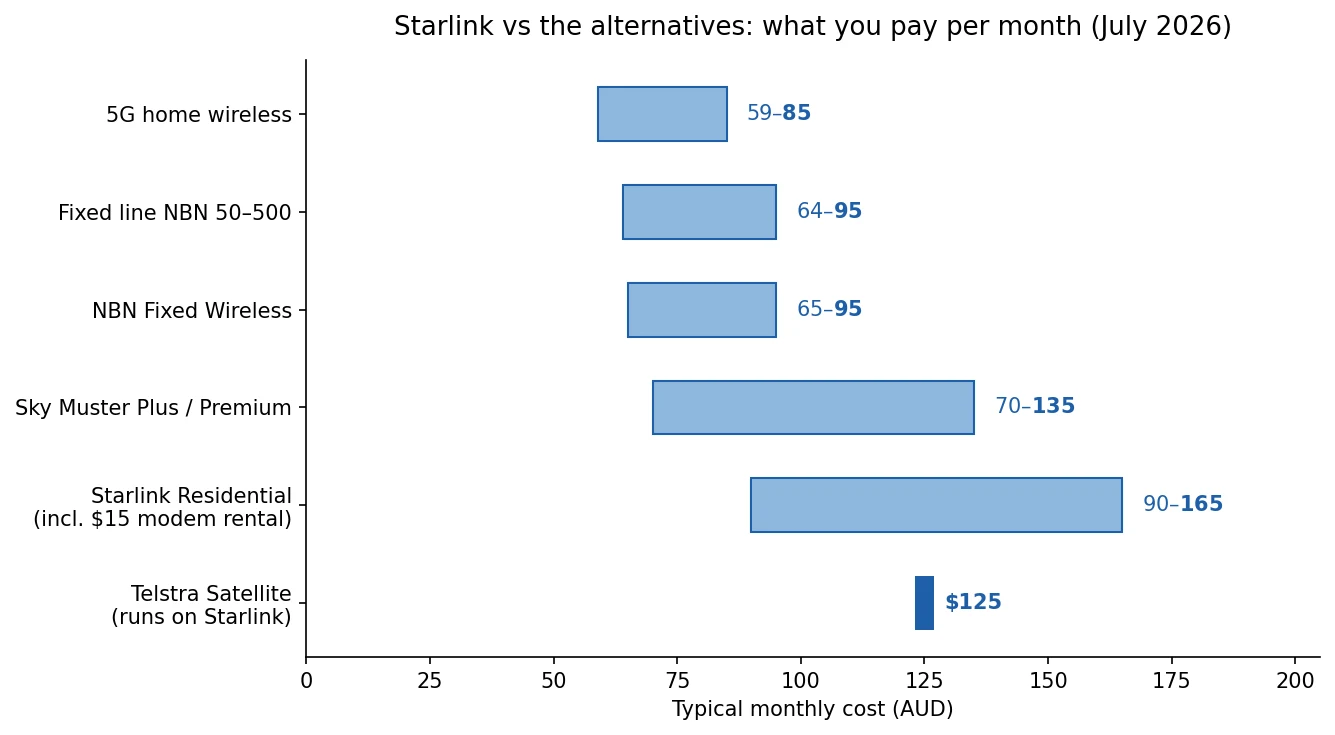
Starlink put its prices up in June 2026, the first rise since it launched in Australia. A typical residential setup now runs $90 to $165 a month once you include the $15 hardware rental. That’s got plenty of people asking what else is out there.
The short answer: it depends entirely on where you live. Starlink’s real competition isn’t another satellite. For most people it’s the NBN in one form or another. Here’s every option worth considering, what it actually costs at the time of writing, and who each one suits.
First, check whether you need satellite at all
This is the step heaps of people skip. Starlink gets talked about as the fix for bad internet everywhere, but if your address can get fixed line NBN or fixed wireless, either will almost always be cheaper, and fixed line will usually be more consistent too. Plenty of semi rural addresses have been upgraded in the last couple of years, and many older FTTN areas are now eligible for a free fibre upgrade. Check your address on the nbn address checker before you spend a cent on satellite gear. And if you’re not sure how bad your current connection really is, run our speed test first so you’ve got a baseline to compare against.
Fixed line NBN: the default if you can get it
If FTTP, HFC or even a decent FTTN line is available, this is the answer. It’s cheaper than Starlink, latency is around 10ms instead of 25 to 40ms, and rain doesn’t touch it. NBN 50 plans start at around $64 a month on promo pricing, and the newer NBN 500 tier is remarkable value at roughly $90 a month for ten times the speed of NBN 50. These are the cheapest plans from providers we track right now:
For the full picture across speed tiers, see our best NBN plans comparison.
NBN Fixed Wireless: better than it used to be
Fixed wireless got a bad reputation years ago and hasn’t fully shaken it, which is a shame because the network upgrades changed the story. Speeds now reach up to 400 Mbps in eligible areas, and typical plans run $65 to $95 a month. The equipment is installed and maintained by nbn for free, so unlike Starlink there’s nothing to rent and nothing to send back. If a tower is within range of your property, check it before satellite. The catch: performance depends on distance and line of sight to the tower, so results vary from property to property.
5G home wireless: the city and big town option
If you’re in a metro area or a large regional centre, 5G home wireless from Telstra, Optus and others delivers 50 to 300 Mbps for $59 to $85 a month with no hardware cost and no installer visit. It’s not an option in genuinely remote Australia, which is where most Starlink interest comes from, but plenty of people on the urban fringe consider Starlink when 5G would do the job for half the price. We’ve covered it in detail in our 5G internet guide.
Sky Muster: the other satellite
Sky Muster is the nbn’s own satellite service and the only true like for like alternative to Starlink today. It’s much cheaper: basic plans start around $35 a month, Sky Muster Plus from around $70, and the uncapped Plus Premium tiers run up to about $135 with speeds up to 100 Mbps in eligible areas. Installation and equipment are handled by nbn for free, with nothing to return if you cancel.
The trade off is latency. Sky Muster’s satellites are geostationary, about 36,000 km up, so latency sits around 600ms against Starlink’s 25 to 40ms. For browsing, email and standard streaming it’s fine. For video calls and gaming it’s noticeable every single time. We’ve compared the two properly in Starlink vs Sky Muster, and if you’re weighing up a specific provider, our SkyMesh vs Starlink page puts real customer reviews side by side.
Amazon Leo: the one actually coming for Starlink
This is the most interesting development in years. nbn has partnered with Amazon to bring Amazon Leo (formerly Project Kuiper) to regional Australia, with trials expected to start in late 2026. Like Starlink, it’s a low earth orbit constellation, so it should deliver similar low latency. Unlike Starlink, it will plug into the existing nbn provider ecosystem, which means you’d buy it through a provider the same way you buy Sky Muster today.
Should you wait for it? If your current connection is unusable, no, get something working now; every plan here is month to month. But if you’re on the fence and coping, late 2026 isn’t far away, and the first real competition Starlink has faced in this country should be good news for prices either way. Time will tell.
Telstra Satellite Home Internet: Starlink with a Telstra bill
Telstra sells a Satellite Home Internet plan for $125 a month that actually runs on Starlink’s network, with download speeds capped at 50 Mbps. You’re paying for Telstra billing and local support rather than dealing with SpaceX directly. For most people going direct to Starlink makes more sense: the entry Residential plan is cheaper and twice as fast. But if you want one bill and a support number you already know, it exists.
What about OneWeb or mobile broadband?
OneWeb operates in Australia but only sells to business and enterprise customers, so it’s not an option for homes. Mobile broadband (a 4G or 5G modem with a data SIM) can work as a stopgap if you have decent mobile coverage, but data allowances make it expensive as a primary home connection for a family. Fine for a temporary fix, not a long term answer. If you need connectivity while travelling rather than at a fixed address, we’ve covered options while you’re on the road separately.
How the alternatives stack up
| Option | Typical monthly cost | Typical speeds | Latency | Best for |
|---|---|---|---|---|
| Fixed line NBN | $64 to $95 | 50 to 500+ Mbps | ~10ms | Anyone who can get it |
| NBN Fixed Wireless | $65 to $95 | 50 to 400 Mbps | ~20 to 40ms | Regional homes near a tower |
| 5G home wireless | $59 to $85 | 50 to 300 Mbps | ~20 to 40ms | Metro and big regional centres |
| Sky Muster Plus / Premium | $70 to $135 | 25 to 100 Mbps | ~600ms | Remote homes on a budget |
| Starlink Residential | $90 to $165 (incl. rental) | 100 to 320+ Mbps | ~25 to 40ms | Remote homes that need performance |
| Telstra Satellite (Starlink) | $125 | Up to 50 Mbps | ~25 to 40ms | One bill with Telstra |
| Amazon Leo | TBA | TBA | Low (LEO) | Trials late 2026, one to watch |
So which alternative should you pick?
If fixed line NBN is available at your address, take it and don’t look back. If you’re regional with a fixed wireless tower in range, that’s the next best thing and there’s no hardware to worry about. In a big town with strong 5G coverage, 5G home wireless will do the job for half of Starlink’s price.
If you’re genuinely remote, it comes down to budget versus performance. Sky Muster Plus is the value pick at $70 odd a month if you can live with the lag. Starlink is the performance pick if you work from home, game, or do a lot of video calls, and the June price rise doesn’t change that maths much because nothing else in remote Australia comes close on speed and latency. And keep one eye on Amazon Leo trials in late 2026; a second LEO player is the best thing that could happen to satellite pricing here.
Frequently asked questions
Is there any satellite internet as fast as Starlink in Australia?
Not right now. Sky Muster Plus Premium can reach 100 Mbps in eligible areas but its latency is around 600ms, which rules out smooth video calls and gaming. Amazon Leo, coming via nbn with trials expected in late 2026, is the first alternative likely to match Starlink on both speed and latency.
What’s the cheapest alternative to Starlink?
If your address can get it, 5G home wireless or a promo fixed line NBN plan at $59 to $70 a month. On satellite, Sky Muster Plus starts at around $70 a month with free nbn installed equipment, against roughly $90 a month all in for entry level Starlink.
Can I avoid Starlink’s $15 a month hardware rental?
Yes. You can buy the standard kit outright for around $549 from JB Hi-Fi, Officeworks or Harvey Norman and pay just the plan price. The rental makes more sense if you’re not certain you’ll keep the service, since you can hand the kit back instead of owning it.
When is Amazon Leo coming to Australia?
nbn and Amazon have announced trials for late 2026, with residential availability to follow. It will be sold through nbn providers rather than direct, so keep an eye on your preferred provider for registration of interest.