Last updated: 22 August 2026
If you’ve just moved into an Australian house and you’re staring at a small white box on the wall with green lights and “NBN” written on it, you’re looking at the NBN box. Properly called the NTD (Network Termination Device). It’s the boundary between NBN Co’s network and your home. Your modem plugs into it via an Ethernet cable, and from there your Wi-Fi takes over. Some people call it the NBN connection box, the NTD box or just the NBN unit; they’re all names for the same device.
The complication: there are six different NBN connection types in Australia, and each one has a different looking box (or in one case, no box at all). This article walks through all six, where they’re usually installed, what the lights mean, and what to do if yours isn’t working.
What the NBN box actually does
The NBN box is the demarcation point between NBN Co’s infrastructure and your house. On one side, fibre, copper or coax cable runs from the street into the box. On the other side, you plug your modem into one of the Ethernet ports on the box, and your modem then broadcasts Wi-Fi inside your home.
You don’t own the NBN box. NBN Co does. They install it during your connection, they maintain it, and if it breaks, they replace it (your retail provider lodges the fault on your behalf). You can’t buy one at a shop, and you shouldn’t try to replace it yourself.
The 6 NBN box (NTD) types
Which box you have depends on what NBN connection your address has. You don’t get to choose. Check on the nbnco.com.au address checker if you’re not sure which type your house uses.

FTTP (Fibre to the Premises)
The “gold standard” NBN box. It’s a small white plastic unit (sometimes called the ONT. Optical Network Terminal) about the size of a thick paperback. It has 4 Ethernet ports labelled UNI-D 1-4 and two phone ports labelled UNI-V 1-2 underneath. A separate power adapter plugs into the wall. A thin fibre optic cable runs from the box into the wall and out to the street.
Usually installed in the garage, laundry, hallway or wherever the original phone line entered the house. Some installations also have a battery backup unit (BBU) mounted next to it, especially on older FTTP connections. Newer installations skip the battery.
FTTC (Fibre to the Curb)
FTTC uses a smaller unit called the NCD (Network Connection Device). It’s a slim white box, around 10cm long, with just one Ethernet port and one phone port. It also has no separate power supply. Power comes via a “reverse-power” feed from a separate “power injector” device that plugs into a phone socket.
NCDs are usually installed at the existing phone socket on a wall in the lounge, kitchen or hallway. The power injector is the slightly chunky white block that’s usually beside it.
FTTN (Fibre to the Node)
This is the one that confuses people. FTTN connections have no NBN box at all. The fibre runs to a node in the street, then copper carries the signal the last leg to your home using your existing phone wiring. Your modem plugs directly into the phone socket using a special VDSL-capable modem, which acts as both modem and the “box” in one.
If your address is FTTN and you’re hunting for “the NBN box” you won’t find one. The modem your provider supplied is doing both jobs. Same goes for FTTB (Fibre to the Building). No NBN box, just a special modem.
HFC (Hybrid Fibre Coaxial)
HFC uses a short, slim NCD (similar name to FTTC’s, slightly different device). It’s a small black or grey box, around 12cm long, with one Ethernet port and a coaxial cable input (the same type of cable as old Foxtel installations. HFC reuses the original cable TV network).
Usually installed wherever the original Foxtel/coax outlet was, typically the lounge wall.
Fixed Wireless
Fixed Wireless has two parts. An outdoor antenna (the dish-shaped unit on your roof or eave that points at the nearest NBN tower) is connected via cable to an indoor NTD. A white box similar in size to the FTTP unit, mounted on an interior wall. The indoor NTD has Ethernet ports your modem plugs into.
Sky Muster (NBN satellite)
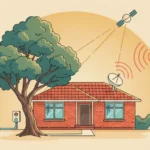
Sky Muster uses a satellite dish (similar to Foxtel’s dish but slightly larger) mounted on the roof, connected via cable to an indoor NTD inside the house. The indoor unit looks similar to the Fixed Wireless or FTTP NTD. Modem plugs into the Ethernet port as usual.
Where is the NBN box in my house?
Common locations, from most likely to least likely:
- Wherever the original phone socket was. NBN installations often re-use the existing phone wall plate. Check the lounge room, hallway, and main bedroom.
- Garage or laundry. Common for FTTP installations because the cable runs naturally to the side of the house.
- Inside a meter box or service cupboard. Less common but happens in apartments and townhouses.
- Outside the house. For FTTP installations on some properties the NBN utility box (the PCD, or Premises Connection Device) is mounted on the outside wall, with the NTD itself usually indoors.
- Anywhere the home owner asked for it. NBN installers will work with the owner during install to find a sensible location, so sometimes it’s just where the original homeowner wanted it.
NBN box vs your modem: what’s the difference?
This is the most common confusion point. The NBN box (NTD) is supplied and owned by NBN Co, it brings the connection into your house. Your modem is supplied by your retail provider (Telstra, Optus, Aussie Broadband, etc.), it converts the NBN connection into Wi-Fi for your devices.
The modem plugs into one of the Ethernet ports on the NBN box. If you want to use your own modem instead of the one your provider supplied, see our BYO modem setup guide.
The exception is FTTN, where there’s no separate NBN box. Your modem plugs straight into the phone socket and acts as both devices in one.
What the lights mean
NBN boxes typically have 4-7 LEDs depending on the type. The general rule for an FTTP NTD:
| Light | Solid green | Flashing | Red or off |
|---|---|---|---|
| Power | Box is on | (rare) firmware update | No power. Check the adapter |
| Optical | Fibre link OK | Connecting | Fibre fault. Call your provider |
| UNI-D 1-4 | Modem is plugged in and active | Data passing through | No device plugged in to that port (normal if you only use one) |
| UNI-V 1-2 | Phone service active | Phone in use | No VoIP service set up (normal if you have no landline) |
If your Optical light is red or off, that’s an NBN fault and you should call your retail provider to lodge it. They’ll run a remote test and if the fault confirms, NBN Co dispatches a technician at no cost to you. See what to do if your NBN keeps dropping out for the full diagnosis flow.
If every light is solid green and you’re still not happy with your speeds, the box isn’t the problem. Run a free speed test to see exactly what you’re getting, then compare it against what you’re paying for.
What if I can’t find the NBN box?
If you’ve moved in and can’t locate it, walk through this checklist:
- Check whether your address is actually NBN-active. Use the nbnco.com.au address checker. If your address shows FTTN, there’s no NBN box to find. Your modem plugs into the phone socket.
- Check the garage, laundry and inside any meter box.
- Look for old phone wall sockets. NBN re-uses these locations a lot.
- Check inside cupboards, especially the entryway cupboard and any hallway cupboards.
- Look outside the house for a small NBN utility box on the wall (the PCD).
- Ask the previous occupant, real estate agent or landlord. They’ll usually know.
Can I move, paint or replace the NBN box?
- Move it? Only via NBN Co. There’s a paid relocation service if you want to shift it to another wall, usually a few hundred dollars. DIY is not allowed.
- Paint over it? No. It needs ventilation and you’ll void NBN Co’s support if you do.
- Cover it with a cabinet? Risky. It needs air circulation and access for technicians. A simple frame around it is fine but a fully enclosed cabinet will cause overheating issues.
- Replace it? Only if it’s faulty. Call your retail provider and they’ll arrange replacement via NBN Co at no cost. You can’t buy one yourself.
I’m renting: what’s my responsibility?
Almost nothing. The NBN box stays at the property when you move out. It belongs to NBN Co and is part of the property’s infrastructure (like the power meter). You sign up to a retail plan in your name, plug your modem into the box, and you’re online. When you leave, you take your modem with you and the NBN box stays. For more on the renter angle see our internet for renters guide.
Frequently asked questions
Where can I buy an NBN box?
You can’t. NBN boxes are supplied and installed by NBN Co during your connection. They’re not sold to the public. If your box is faulty, your retail provider arranges a replacement through NBN Co at no cost. JB Hi-Fi, Officeworks and Bunnings don’t stock them and never will.
Why doesn’t my house have an NBN box?
Either you’re on FTTN or FTTB, where there’s no NBN box (the modem itself does the job), or your house hasn’t been NBN-connected yet. Check your address on nbnco.com.au.
My NBN box has a red light. What now?
A red light on the Optical or Power LED usually means a fault. Call your retail provider, tell them which light is red, and they’ll run a remote test. If it’s a fault on NBN Co’s side, a technician will be dispatched at no cost. Don’t try to fix it yourself.
What’s the difference between NBN box and NTD?
Same thing. NTD stands for Network Termination Device. The technical name. “NBN box” is what most people call it. Same device.
Do I need to plug my modem into a specific port on the NBN box?
For FTTP, plug into the UNI-D port your provider activated, usually UNI-D 1. Your provider will tell you which one when you sign up. For other connection types there’s usually only one port so it’s not a question.
Can I use the NBN box’s phone ports for my home phone?
On FTTP and Fixed Wireless yes, if your retail provider activates VoIP on UNI-V 1 (some do automatically, some charge a monthly fee). On HFC, FTTN and FTTC you typically use VoIP through your modem instead.
For step-by-step modem setup once you’ve found your NBN box, see our FTTP connection box setup guide, the BYO modem setup guide, or the broader NBN FAQ.