Last updated: 21 August 2026
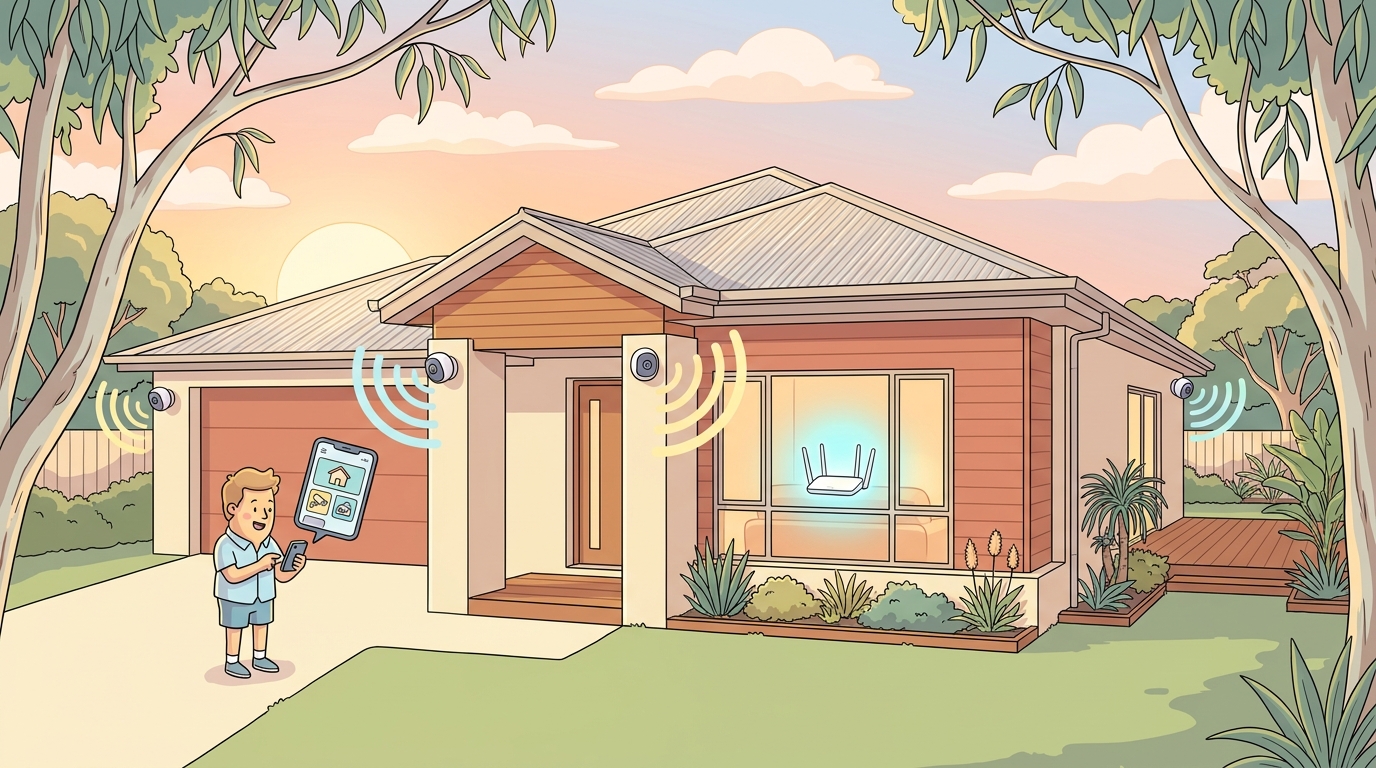
One HD security camera streaming continuously to the cloud needs about 2 Mbps of upload speed. Four cameras need around 8 Mbps. Eight 4K cameras can need 64 Mbps of upload, more than most NBN plans deliver. The number that matters for security cameras is upload speed, not download, and most home internet plans have far less upload than download.
This guide covers what upload speed each camera quality actually needs, how the numbers scale with multiple cameras, and which NBN tier suits each setup.
Why upload speed matters more than download
For everything else on your home internet, Netflix, browsing, gaming, download speed dominates. For security cameras it’s the opposite. Cameras spend their time pushing video out to the cloud (or to your phone when you check the live feed). The actual download involved is tiny.
That’s a problem because Australian NBN plans are asymmetric. NBN 25 has 5 Mbps upload. NBN 50 and NBN 100 both have 20 Mbps upload. So upload bandwidth is much scarcer than download bandwidth, and your cameras might be the biggest single user of upload in the house.
Bandwidth per camera by quality
Modern Wi-Fi security cameras use H.264 or H.265 video compression. Typical continuous upload bitrates:
| Camera quality | Upload per camera | Notes |
|---|---|---|
| HD (1080p) | ~2 Mbps | Most Ring, Nest, eufy entry cameras |
| 2K (1440p) | ~4 Mbps | Mid-range cameras (Arlo Pro, eufy 2K) |
| 4K (2160p) | ~8 Mbps | Premium cameras (Nest Doorbell 4K, Reolink 4K) |
| Audio + motion only | <1 Mbps | Cameras only streaming on motion events |
The “audio + motion only” mode is useful. Most cameras only push high-quality video when they detect motion, otherwise they’re idle or sending very low-rate thumbnails. So the table above is a worst case for cameras streaming continuously.
How many cameras can your internet handle?
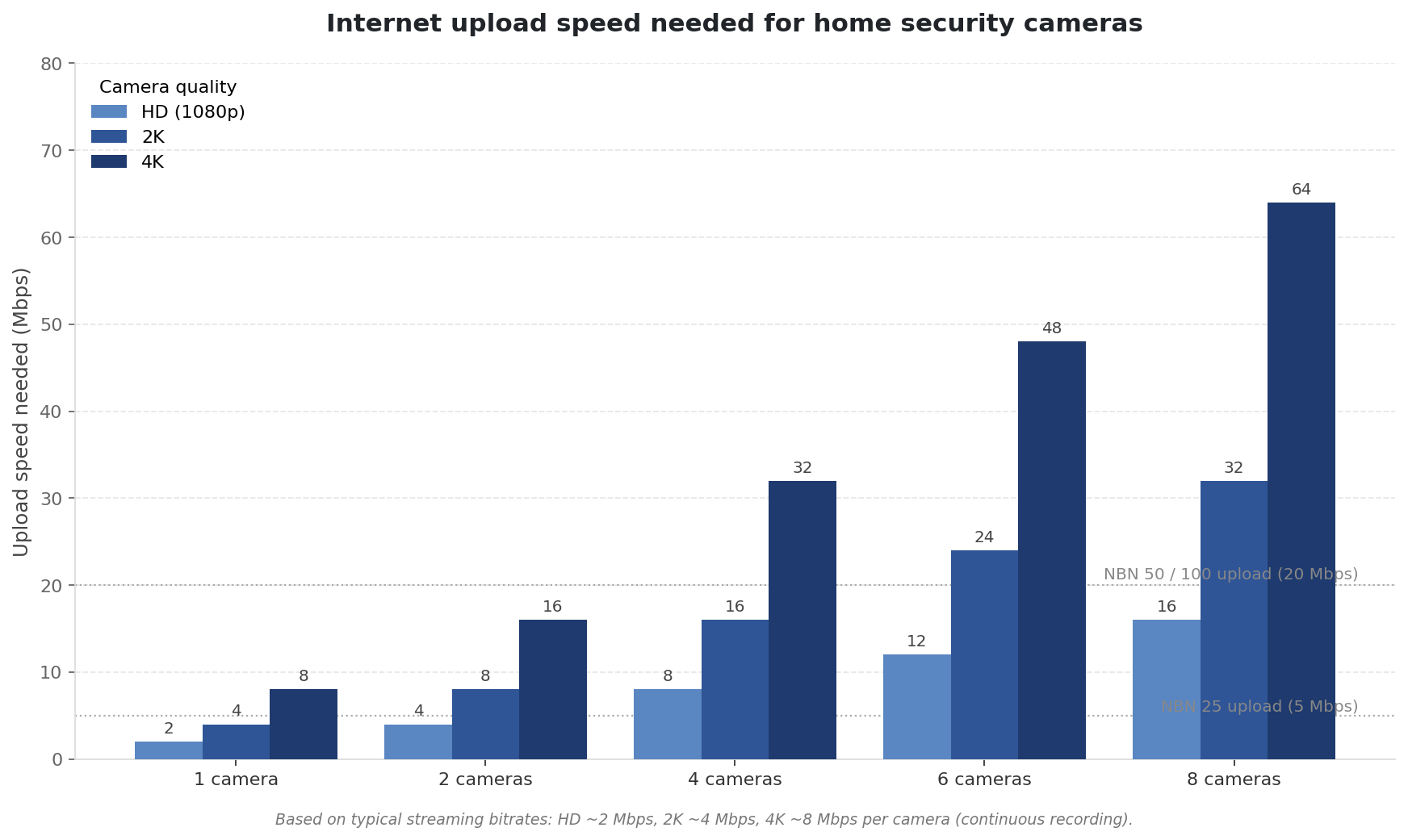
A few practical conclusions from the chart:
- NBN 25 (5 Mbps upload) — fine for 1–2 HD cameras. 4K cameras will saturate it on their own.
- NBN 50 or 100 (20 Mbps upload) — handles up to about 8 HD cameras, 4 x 2K cameras, or 2 x 4K cameras comfortably.
- NBN 250 (25 Mbps upload) — incremental improvement; only matters for serious multi-4K-camera setups.
- NBN 1000 (50 Mbps upload) — enough for 6 x 4K cameras or 12+ HD cameras.
Most Australian homes have 2–4 cameras at HD or 2K, which sits comfortably inside NBN 50’s headroom.
Cloud storage vs local NVR
Where your camera footage is stored has a big effect on bandwidth.
- Cloud storage (Ring, Nest, Arlo, eufy cloud). Every frame the camera records is uploaded. Bandwidth usage is highest. Convenient but ongoing subscription fees.
- Local NVR / network video recorder. Cameras send footage to a box plugged into your network. The box stores everything locally. You only use upload bandwidth when you’re checking the feed remotely from your phone.
- Hybrid (local recording, cloud thumbnails / clips). The middle ground that some Eufy and Reolink setups offer. Saves both bandwidth and subscription fees.
If you’re maxing out your upload speed and don’t want to upgrade, switching from cloud storage to local NVR cuts upload usage to near zero.
Notes by brand
- Ring (Amazon). Cloud only. HD streams ~1.5–2.5 Mbps per camera. Subscription required for recording.
- Nest (Google). Cloud focused. HD ~2–3 Mbps, 4K Nest Doorbell ~6–8 Mbps. Subscription for recording history.
- Arlo. Cloud or local hub. HD ~2–3 Mbps, 2K ~4–5 Mbps. Hub-based local storage available on Pro models.
- eufy (Anker). Mostly local-storage focused. Lowest cloud-bandwidth use of the four. HD ~2 Mbps, 2K ~4 Mbps.
- Reolink, Hikvision, Dahua. Local NVR oriented; designed for wired-PoE multi-camera setups. Bandwidth largely on your LAN, not your internet upload.
Wi-Fi vs Ethernet for cameras
Wi-Fi cameras are easier to install but add load to your home network and depend on signal strength at the camera location. Ethernet (PoE. Power over Ethernet) cameras are more reliable but need cabling run to each camera position. For 4 or more cameras, PoE is usually worth the install effort.
If your cameras are dropping out, it’s almost always Wi-Fi signal or congestion, not internet speed. Our guides on Wi-Fi range extenders vs mesh networks and 5 things killing your home Wi-Fi signal cover the fixes.
Battery cameras vs wired cameras
Battery-powered cameras (most Ring, Arlo, eufy battery models) save bandwidth by default because they only record on motion to preserve battery life. Wired cameras can run continuously, which uses more bandwidth but gives you complete footage history.
If bandwidth is a concern, battery cameras with motion only recording are the bandwidth friendly choice.
Frequently asked questions
What internet speed do I need for Ring cameras?
Ring recommends a minimum of 2 Mbps upload per camera. So 1–2 Ring cameras work on NBN 25; 3+ cameras you want NBN 50 or higher for the headroom.
Is 25 Mbps enough for security cameras?
NBN 25 has 5 Mbps upload, which handles 1–2 HD cameras. Not enough for 4K or for multi-camera setups. NBN 50 (20 Mbps upload) is the safe choice for most security camera households.
Do security cameras slow down my internet?
They can, especially during peak hours when everyone in the house is also online. Continuous recording cameras use bandwidth steadily; motion only cameras only spike when triggered. If your video calls or streams suffer when cameras are active, you’ve maxed out your upload.
Can I run security cameras on 5G home internet?
Yes. 5G home plans typically deliver 20–80 Mbps upload, which is plenty for most camera setups. The main caveat is reliability. Fixed-line NBN is more consistent than 5G, which matters when cameras need to stay online 24/7.
Will my cameras still record if the internet goes down?
Depends on the camera. Local NVR setups keep recording fine. Cloud-only cameras (most Ring, basic Nest) stop recording when the internet drops out. Hybrid setups record locally during outages and upload when the connection returns.
How much data do security cameras use per month?
One HD camera streaming continuously uses around 650 GB/month. Motion only recording cuts that to 30–100 GB. On an unlimited NBN plan it doesn’t matter. On mobile broadband or Starlink Roam, security cameras will chew through data caps fast.
For broader troubleshooting if your cameras are unreliable, see our guide on why is my internet slow. To browse NBN plans by upload speed, use our plan finder.