Last updated: 21 August 2026
You’ve run a speed test on your home internet and now you’re staring at three or four numbers and not sure whether they’re good. Or you’re wondering why a speed test you ran yesterday gave you 84 Mbps and one you ran this morning gave you 47 Mbps. Or you just want to know what a speed test actually measures and whether it’s telling you the truth.
This page explains how internet speed tests work, what the four or five numbers mean, what’s normal for your plan in Australia, and the reasons your result might be lower than expected. If you just want to run a test on our own free tool, head over to test your internet speed. That page has the speed test embedded and a results troubleshooting walkthrough. This page is the why, not the how-to.
The four numbers, in plain English
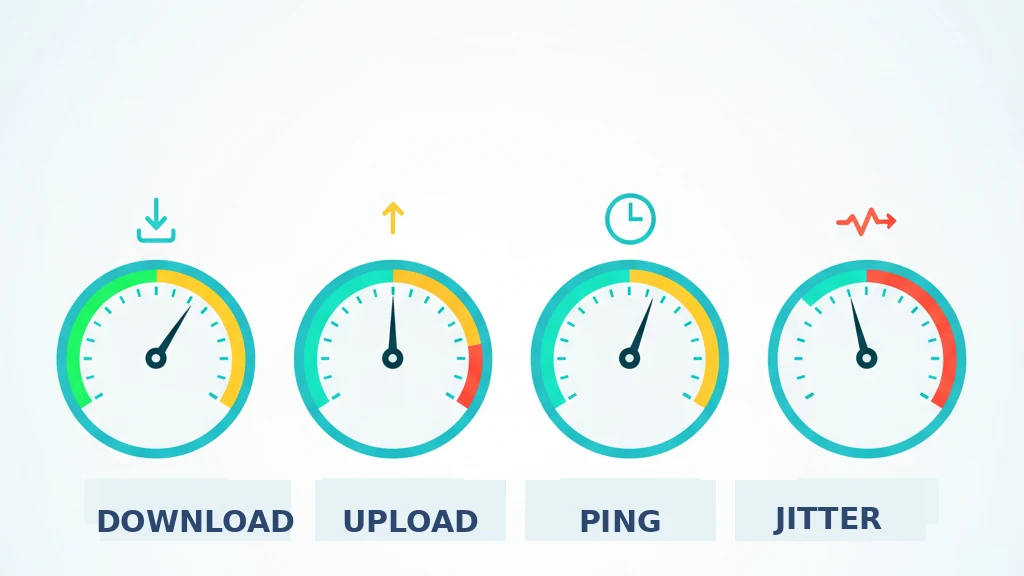
| Metric | What it measures | What’s “good” in Australia |
|---|---|---|
| Download (Mbps) | How fast data comes TO your device from the internet. Streaming, browsing, downloads. | Depends on your plan tier. NBN 50 should give you 42+ Mbps at peak; NBN 100 should give 85+. |
| Upload (Mbps) | How fast data leaves your device for the internet. Video calls, cloud backup, sending email attachments. | NBN upload is usually a small fraction of the download — NBN 50 caps at 20 Mbps upload, NBN 100 at 40. |
| Ping (ms) | How long it takes for a tiny packet to leave your device and come back. Latency. | Under 20ms is excellent. 20-50ms is fine. Above 100ms you’ll feel it in any real-time application. |
| Jitter (ms) | How much your ping varies from one moment to the next. | Under 5ms is excellent. Above 30ms causes lag spikes in gaming and choppy video calls. |
| Bufferbloat (A–F) | How much your latency rises when the line is busy. Not measured by Ookla. Measured by Cloudflare, Waveform, and our tool. | A or B is fine. C is borderline. D or F means SQM/QoS on your router would fix it. |
Most speed tests show all four. Some only show the first three. The rest of this article goes into each one and tells you what to do if yours don’t look right.
How an internet speed test actually works
Under the hood, a speed test isn’t magic. It’s a small piece of code running in your browser that does four things, one after another:
- It picks a server. The site looks at where you are and tries to find a test server nearby. Ookla’s network has thousands of servers around the world, but for Australian users it’ll usually pick a Sydney, Melbourne, Perth or Brisbane one. The closer the server, the more accurately the test reflects your connection to the wider internet. Our own speed test tool runs from a single Sydney server, on purpose. We built it that way so the latency number isn’t polluted by a transpacific hop.
- It measures ping and jitter first. Small packets are sent to the server and timed. Ping is the average round trip; jitter is the variation. This usually takes a few seconds.
- It tests download. The test downloads a steady stream of data from the server, often using multiple parallel connections to make sure it can saturate your line. It measures how fast that stream lands on your device, watching for the speed to ramp up and settle on a maximum.
- It tests upload. Same thing in reverse. The test uploads a stream of data to the server and measures how fast it goes out.
- The better ones also measure bufferbloat. While the download burst is running, the test fires extra ping packets to see how much your latency rises when the line is busy. The gap between that loaded ping and the original unloaded ping is your bufferbloat number, usually expressed as an A to F grade. Ookla skips this. Cloudflare and Waveform measure it. Our tool measures it too.
The whole test usually takes 20-60 seconds depending on how fast your connection is and how thoroughly the test wants to be. A 1000 Mbps NBN line actually finishes faster than a 25 Mbps one in absolute terms, because the test serves more data in less time.
What a speed test is NOT doing: it’s not testing your “internet speed” the way most people imagine that phrase. It’s testing the speed between your device and that specific test server, at that specific moment, using that specific browser. Your actual experience using YouTube, Netflix, your work VPN or your favourite game depends on the connection between your device and THOSE servers. Which might be in California, not Sydney.
What “good” looks like by plan tier
Once you’ve got a number, the next question is “is that good?” The answer depends entirely on what plan you’re on. A 47 Mbps result is brilliant on NBN 50 and dismal on NBN 100. Here’s the reference card.
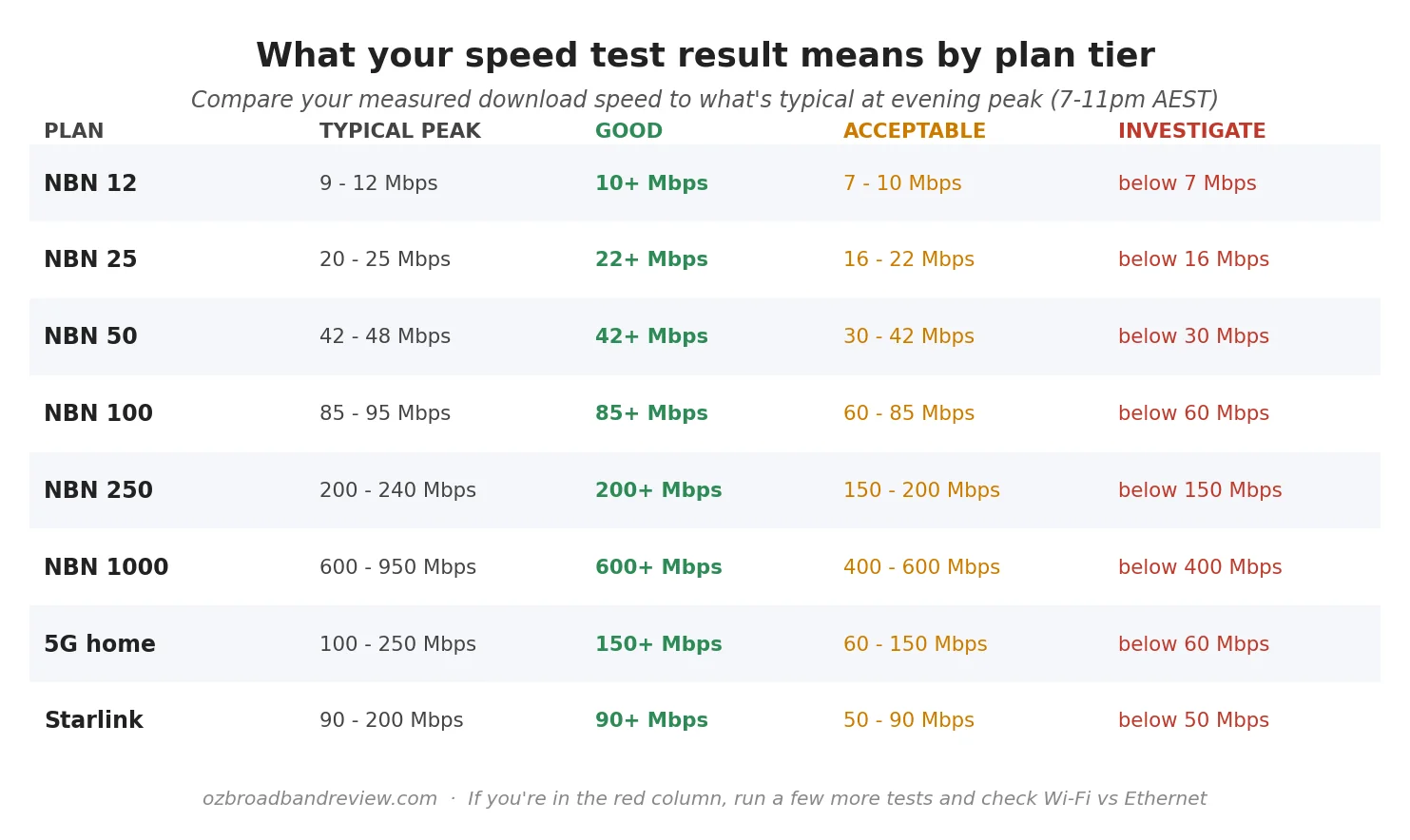
A couple of notes on this table. These are evening peak (7-11pm AEST) numbers. Off-peak you can expect higher, sometimes a lot higher. Daytime results that look exceptional don’t necessarily mean your plan will deliver them when it counts.
Also. Your plan caps you at a maximum. NBN 50 cannot give you 85 Mbps no matter what; that’s not a problem with your test or your line, it’s the design of the plan. If you’re seeing roughly the right number for your tier, your connection is doing what you’re paying for.
Upload is the one most people forget about
Most NBN plans in Australia are asymmetric, which means download and upload are not the same. Here’s roughly what your plan tier caps at on upload:
| Plan tier | Download (Mbps) | Upload (Mbps) |
|---|---|---|
| NBN 12 | 12 | 1 |
| NBN 25 | 25 | 5 |
| NBN 50 | 50 | 20 |
| NBN 100/20 | 100 | 20 |
| NBN 100/40 | 100 | 40 |
| NBN 250 | 250 | 25 |
| NBN 1000 | 1000 | 50 |
If you’re working from home with a lot of video calls or you back up to cloud storage, upload matters more than download. NBN 100/40 (with 40 Mbps up) is the most commonly recommended tier for serious WFH users. We’ve gone deep on this on best NBN plans for working from home.
Ping and jitter are the gaming numbers
Ping is the round trip time to a server. Jitter is the variation in that ping over a series of samples. Both are reported in milliseconds (ms) and both have one rule: lower is better.
For NBN fixed-line plans in metro Australia, ping to a local server should be 10-20ms. NBN Fixed Wireless and 5G home wireless tend to be 20-40ms. Starlink runs 25-45ms. Sky Muster satellite is 600ms+, which is why it’s a non-starter for anything real-time.
Jitter under 5ms is normal for fixed line and fine. Jitter under 15ms is acceptable for casual gaming and video calls. Above 30ms and you’ll notice lag spikes in any competitive online game. The jitter problem is most pronounced on wireless connections (mobile 5G, home 5G, fixed wireless). We’ve gone into more detail in 5G vs NBN comparison.
Bufferbloat. The silent killer.
If your home internet feels slow even when the speed test says it isn’t, the answer is usually bufferbloat. The speed test runs in isolation, line idle, no one in the house using anything else. In that situation your connection looks great. The moment someone fires up a 4K Netflix stream or kicks off a big cloud backup, your ping doubles or triples, and every voice call, video call and game on the network starts glitching.
This is bufferbloat. It happens because consumer modems and routers buffer too much data when the line is busy. The buffers fill up with download packets, and your small latency sensitive packets sit in the queue waiting their turn. By the time they get out the door they’re late. Even though your line is theoretically delivering 100 Mbps, the experience on every responsive thing you do is terrible.
The fix is smart queue management on your router. Most off the shelf consumer routers don’t have it. Routers running OpenWrt do, and most prosumer brands (Ubiquiti, MikroTik, the better ASUS models) have it under a name like SQM, QoS, or fq_codel. Turn it on. Your bufferbloat grade should go from D or F to A overnight, and the family will stop yelling at you when they can’t hear the other end of a Zoom call.
Cloudflare’s speed.cloudflare.com, the Waveform bufferbloat test and our own speed test all show bufferbloat as an A to F grade. Ookla’s web test doesn’t. If your normal speed test result looks fine but your house feels slow, run a bufferbloat test before you complain to your provider.
Why your result varies from one test to the next
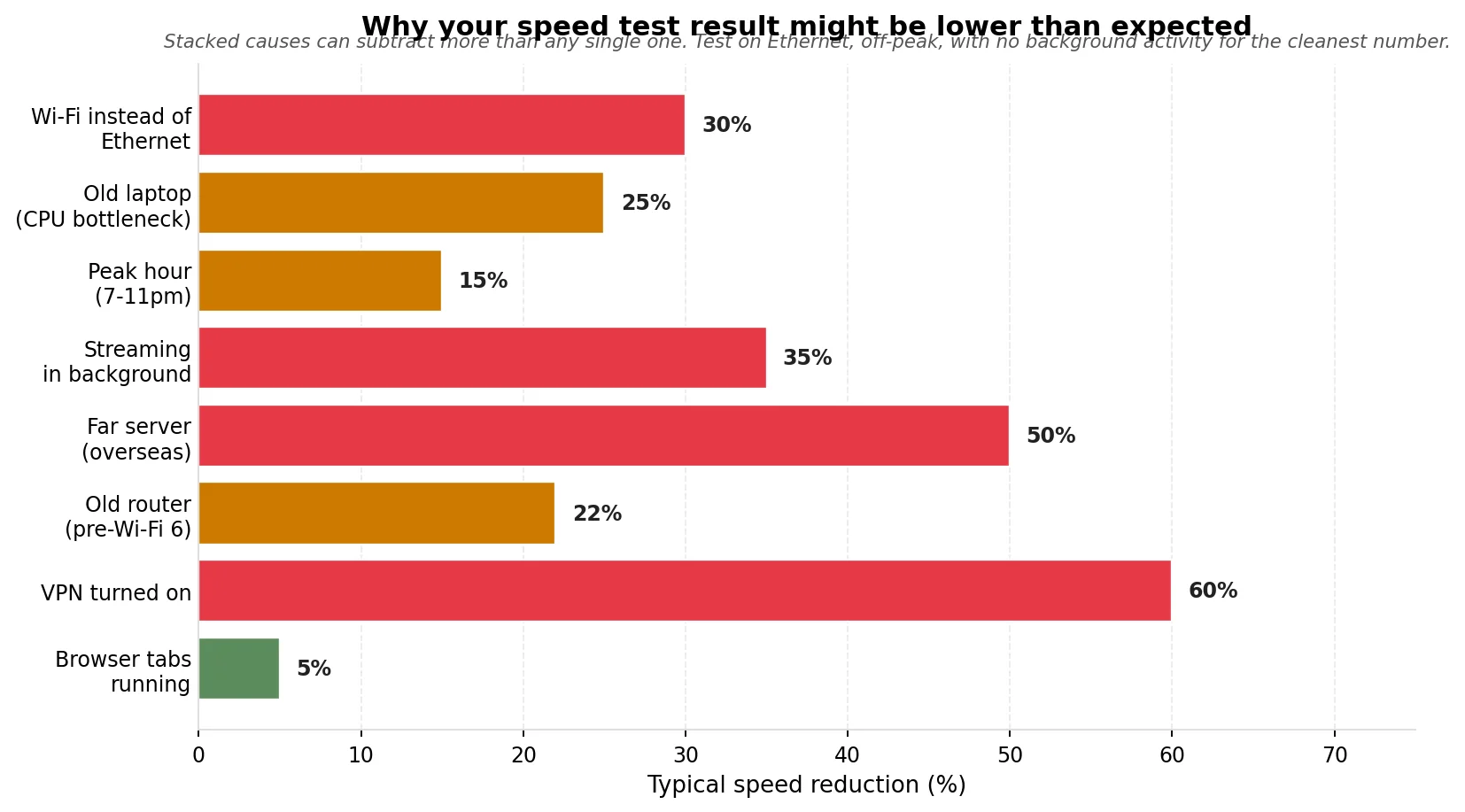
If you’ve run two tests an hour apart and got wildly different numbers, this is the part you want. There are eight common causes of a low-looking speed test result. None of them mean your NBN is broken.
Wi-Fi instead of Ethernet
If you’re testing your “internet speed” from a laptop on Wi-Fi in the next room, you’re really testing your Wi-Fi speed. A weak 2.4 GHz signal can easily knock 30% off your real line speed. The fix is to plug an Ethernet cable into your laptop and test again. If the cabled test gives you the expected number and the Wi-Fi test doesn’t, the problem is your Wi-Fi, not your NBN.
Old laptop or phone
Speed tests load the CPU of the device running them, because the data has to be decompressed and counted in real time. An old laptop running through a heavy browser can max out its CPU before it maxes out the connection, so the “speed” reported is actually a CPU bottleneck. If you’re on a six-year-old laptop and the test caps at 250 Mbps no matter what, try a modern phone on the same Wi-Fi. If the phone goes faster, your laptop was the limit.
Peak hour (7-11pm)
NBN providers buy a fixed amount of capacity (called CVC) from NBN Co for each customer area. During peak hour, more people use it. The better providers buy enough to keep speeds at the advertised number through peak; the cheaper providers don’t. A 15% slowdown between 7pm and 11pm is normal. A 40% slowdown is a sign your provider is under-provisioned.
Background downloads and streaming
If you’re running a speed test while someone else in the house is streaming Netflix or downloading a game, your test will show less than your real line speed. Pause everything else and run the test fresh.
VPN turned on
The single most common cause of an unexpectedly slow speed test result. If you have a VPN active, your test data is going through an extra encrypted server, often in a different country. A VPN can knock 40-70% off your real speed. Turn it off, test again. If you forget about a system-wide VPN running on your router (some routers have one), check the router admin page.
A test server in another country
If the test picks a server in Singapore or California, you’ll get a much worse number than if it picks one in your home city. Most speed test tools pick automatically, but check. The server name is usually shown on screen. Pick a Sydney/Melbourne/Brisbane/Perth server in the dropdown if available.
Old router
A router from 2018 isn’t going to push 700 Mbps to a phone in another room no matter how good your line is. The Wi-Fi standard matters. Wi-Fi 5 (released 2014) maxes out around 400-500 Mbps in practice; Wi-Fi 6 (2019) can do 800+; Wi-Fi 6E and Wi-Fi 7 are faster again. If you’ve moved up to NBN 250 or NBN 1000 and aren’t seeing the speed, your router might be the bottleneck.
Other tabs and apps eating bandwidth
An open YouTube tab playing in the background. A Steam update running. Dropbox syncing photos from your last holiday. Speed tests give the cleanest result with absolutely nothing else competing for the connection.
Are speed tests accurate? Are they safe?
Are they accurate? Yes, broadly. The major tests (Ookla Speedtest, the Netflix run fast.com, our own speed test tool) all measure the same fundamentals and give very similar results on a clean connection. Slight differences come from which server they pick, how aggressively they ramp the test, and whether they use single or parallel streams. If three different tests run back-to-back give you results within 10% of each other, that’s your real number.
Are they safe? Yes. A speed test doesn’t transmit any personal data. It sends and receives random bytes for timing purposes. They use some data (typically 100-500 MB for a full test depending on your line speed), so don’t run them on a metered mobile plan where data is precious. On home internet with unlimited data, they’re free.
Can a speed test tell if my provider is throttling me? Not really. ISPs in Australia generally don’t throttle individual users by content type. The slowdowns you see are usually CVC congestion (the whole area capacity problem), not targeted throttling. If your speed test result is consistently low at peak but fine off-peak, that’s a CVC issue and you’d see it on any test.
How to get a fair test
To get a clean read of your real connection, do this:
- Plug a laptop into your router with an Ethernet cable. If you can’t, use Wi-Fi but stand right next to the router with no walls in between.
- Pause everything else on the network — no Netflix, no big downloads, no other people in voice calls.
- Turn off any VPN.
- Close other browser tabs (especially video).
- Run a test on a Sydney/Melbourne server. Note the number.
- Run it again ten minutes later. And once more after that.
- Take the median of the three results. That’s your real line speed.
If you want to know how your connection performs at peak hour vs off-peak, repeat the same routine at 8am and again at 8pm. The difference between the two is how badly your provider is over-subscribing the local CVC. Aussie Broadband, Superloop and a few others publish their CVC ratios publicly. Cheaper providers tend not to.
If you’d rather not run the test by hand all day, we built OBBR Pulse for that. Open it in a popout window, give it an email to save results against, and it’ll run a fresh test every 30 minutes and chart your speed over time. When you eventually ring your provider you can point at the chart and show them exactly when their network goes to pieces.
Now run a test
If you’ve read this far and you haven’t actually tested your connection yet, do that now. Our tool is the fastest path to a Sydney server and it doesn’t try to sell you anything.
Frequently asked questions
Are internet speed tests accurate?
The major speed test tools measure the same things in similar ways and produce results within 10% of each other on a clean connection. They’re accurate enough that if three back-to-back tests give you roughly the same number, that’s your real line speed. Big variation between tests usually means something on your end is interfering. Wi-Fi distance, a VPN, background activity, or a CPU bound device.
What does ping mean on a speed test?
Ping is the round-trip time for a tiny data packet to leave your device, reach the test server, and come back. Measured in milliseconds. It tells you how responsive your connection is. Important for video calls and gaming. Under 20ms is excellent in Australia; under 50ms is fine for everything; over 100ms is noticeable in real-time apps.
What does jitter mean?
Jitter is the variation in your ping from one packet to the next. A ping that averages 20ms but swings between 10 and 50 has high jitter. Low jitter (under 5ms) is what you want. It means your connection is consistent. High jitter shows up as lag spikes in games, choppy audio in voice calls, and stuttering in cloud gaming.
Why do my speed test results vary so much?
The most common reasons are: Wi-Fi distance from the router, time of day (peak congestion), a VPN, other people or apps using the connection, and an old device or router. Run a test on Ethernet, off-peak, with nothing else running and a Sydney server selected. That’s your real number. Other tests are just measuring your real number minus whatever was interfering.
Do speed tests use my data?
Yes. A full speed test transfers somewhere between 100 MB and 500 MB depending on how fast your line is. The faster the line, the more data the test needs to saturate it. On home internet with unlimited data this doesn’t matter. Don’t run repeated speed tests on a metered 4G/5G mobile plan unless you have a lot of data to spare.
Are speed tests safe?
Yes. Speed tests don’t transmit personal data. They send and receive random bytes to measure timing. They don’t read your files, see what websites you visit, or expose anything from your device. They run inside a normal web browser like any other web page.
What’s a good speed test result for an NBN 50 plan?
At evening peak (7-11pm), an NBN 50 plan should give you 42-48 Mbps download. Below 30 Mbps at peak is worth raising with your provider. They should be hitting at least 80% of the advertised speed at peak under TIO guidelines. Upload caps at 20 Mbps, and ping should be 10-20ms on a fixed-line connection.
Why is my speed lower than my plan?
Several common reasons: you’re testing over Wi-Fi instead of Ethernet, a VPN is active, it’s evening peak, other devices on the network are using bandwidth, your router is too old to push the full speed, or your provider has under-bought CVC for your area. The “why your result varies” chart earlier in this article lists the eight typical causes and the percentage hit each one typically takes off your number.
Which speed test should I use?
Any reputable one is fine. Ookla’s Speedtest, fast.com (Netflix run, simpler), Cloudflare’s speed.cloudflare.com (good for transparency) and our own free speed test all measure the same fundamentals. Run more than one and look for a consistent number. If all three give you similar results, that’s your real speed.
Does my browser affect speed test results?
Slightly, yes. A speed test runs JavaScript inside your browser, and a heavy browser with lots of tabs open will leave less CPU available for the test. Run the test in a fresh window with no other tabs open if you want the most accurate result. Chrome, Firefox and Safari all produce similar numbers when given the same conditions.