
If you’ve narrowed your home connection down to NBN or 5G and you mostly use the internet for gaming, the short answer is this: for serious online gaming, a fixed-line NBN connection still wins almost every time. The longer answer depends on what you play, where you live, and whether you’re gaming on a phone or a console.
This guide is about the gamer specific question, not the broader “is 5G better than NBN for general home use” question. If you want the all-purpose comparison, we’ve already written that up over on 5G home wireless vs NBN. If you’re after specific gaming plan picks, we’ve ranked them on best NBN plans for gaming. This page sits in the middle, it’s the one that explains why one wins over the other for gamers, with real numbers.
The short version
| What you play | Better pick | Why |
|---|---|---|
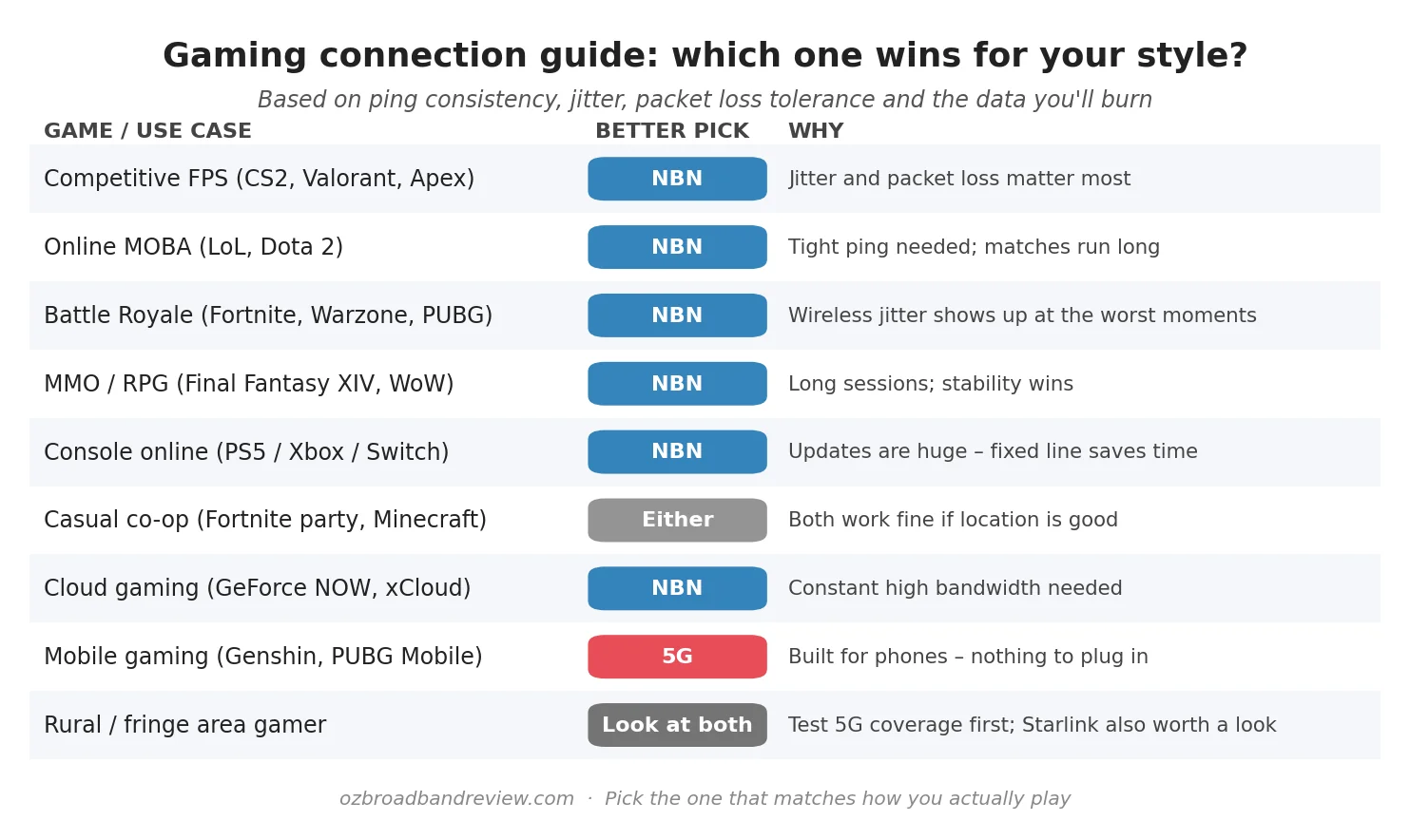
| Competitive FPS, MOBA, ranked anything | NBN (fixed line) | Jitter and packet loss matter more than raw speed. Fixed line is more consistent. |
| MMO, RPG, long campaign sessions | NBN | You’re online for hours. A dropped connection mid-raid is rough. |
| Console online (PS5, Xbox, Switch) | NBN | Game updates are 50–150 GB. You’ll burn 5G data caps fast. |
| Casual co-op, party games | Either | If your 5G signal is strong, both work fine for casual play. |
| Mobile gaming on your phone | 5G | Built for it. Nothing to plug in. Tower coverage permitting. |
| Cloud gaming (GeForce NOW, xCloud) | NBN | Needs constant high bandwidth and tight latency at the same time. |
| You live somewhere with patchy NBN | Test 5G first | If 5G is strong in your suburb it’s a genuine option. Starlink is also worth a look. |
The rest of this article goes through the why.
What gaming actually needs from your internet
People who don’t play games online assume the question is about download speed. It usually isn’t. Most modern multiplayer games use very little bandwidth in-game. Anywhere from 100 KB to a few megabytes per minute. A 25 Mbps connection is enough to run most online games comfortably, including Fortnite, Call of Duty, Valorant, League of Legends, Apex, FIFA, Rocket League, you name it.
What gaming actually needs is three things:
- Low ping (latency). The time it takes for a packet to leave your console, hit the game server, and come back. Measured in milliseconds. Under 20ms is excellent, 20–50ms is fine, 50–100ms is playable but you’ll start to feel it, 100ms+ and you’re at a disadvantage in anything competitive.
- Low jitter. This is the variation in ping from one packet to the next. A connection that averages 20ms but swings between 10ms and 60ms is much worse for gaming than one that averages 25ms but never strays more than a couple of milliseconds. Jitter is the silent killer of online gaming.
- Low packet loss. Packets that never arrive are the worst kind. A few lost packets and the game has to guess what happened. You see this as rubber-banding, missed shots, or “lag spikes”. Anything above 1% loss starts to feel rough.
Speed matters for a few things. Downloading game updates, streaming high-res in-game video, and running cloud gaming services. For everything else, what you really want is a connection that delivers small packets to a game server consistently, every few milliseconds, with no variation. Boring, predictable, and tight.
That’s why fixed-line NBN tends to win for serious gamers. Wires don’t suddenly run into a neighbour microwaving leftovers.
NBN for gaming
“NBN” covers a lot of different physical connection types. FTTP (fibre to the premises), FTTC (fibre to the curb), HFC (hybrid coax), FTTN (fibre to the node), Fixed Wireless and Sky Muster satellite. Not all NBN is created equal for gaming. Here’s how the connection types stack up.
| NBN connection | Typical ping to Sydney | Jitter | Good for gaming? |
|---|---|---|---|
| FTTP (full fibre) | 10–15ms | Very low | Excellent |
| HFC (cable) | 12–18ms | Low | Very good |
| FTTC (fibre to curb) | 12–20ms | Low | Very good |
| FTTN (fibre to node) | 15–30ms | Moderate | Fine for most games |
| NBN Fixed Wireless | 20–40ms | Moderate to high | Playable, not ideal |
| Sky Muster satellite | 600ms+ | High | Avoid for real-time games |
If you’re on FTTP, HFC or FTTC, gaming is going to feel good as long as your speed tier is sensible. The NBN 50 plan is plenty for most households. If multiple people in the home stream and game at the same time, an NBN 100 plan removes the last few situations where you’d notice contention. Above that, you’re paying for download speed you won’t feel in-game.
The NBN free FTTP upgrade is also worth knowing about if you’re stuck on FTTN. NBN Co is offering free upgrades from copper based connections to full fibre in a lot of suburbs now. If you’re a serious gamer on FTTN, check your address on the NBN Co site and switch to a plan that triggers the upgrade. It’s the cheapest performance boost you’ll ever get.
Here are the cheapest NBN plans being run by providers that are good fits for gamers. Speeds that won’t cripple you, providers with decent network performance, and no nasty contention surprises. The table below is live and updates as the providers change their pricing.

|
One Plan
500 Mb/s
Unlimited data
|
$80/mth | Go to site |

|
Extra Value
50 Mb/s
Unlimited data
|
$85/mth | Go to site |
|
|
Fixed Wireless Plus
50 Mb/s
Unlimited data
|
$89/mth | Go to site |

|
Value - nbn 50/20
50 Mb/s
Unlimited data
|
$93/mth | Go to site |
|
|
Fixed Wireless Plus - nbn 100/20
100 Mb/s
Unlimited data
|
$93/mth | Go to site |
| Click here to view more NBN gaming plans | |||
5G for gaming: home wireless vs mobile
There’s a confusing thing about 5G in Australia. The same letter “G” gets used for two different products:
- 5G home wireless. A modem that sits in your house, plugs into the power, and connects to a nearby 5G cell tower instead of a cable in the ground. Telstra, Optus and TPG all sell these as NBN alternatives — typically $60–$95 a month for unlimited.
- Mobile 5G. Your phone, or a mobile hotspot device with a 5G SIM. Tethering your phone to a console works, but you’re sharing your phone’s data cap and battery.
People mix these up all the time. They are not the same thing for gaming. Mobile 5G into a phone is great for casual mobile games. 5G home wireless is a real NBN alternative for households where fixed line coverage is poor.
The 5G ping numbers you see in marketing material, “as low as 1ms!”, refer to a theoretical edge case nobody actually experiences. In the real world, a 5G connection in Sydney pings a Sydney game server at around 20–30ms on a good day. That’s fine. The problem is that “on a good day” qualifier.
The jitter problem (this is the big one)
This is the chart that explains why competitive gamers on fixed-line NBN don’t switch to 5G:
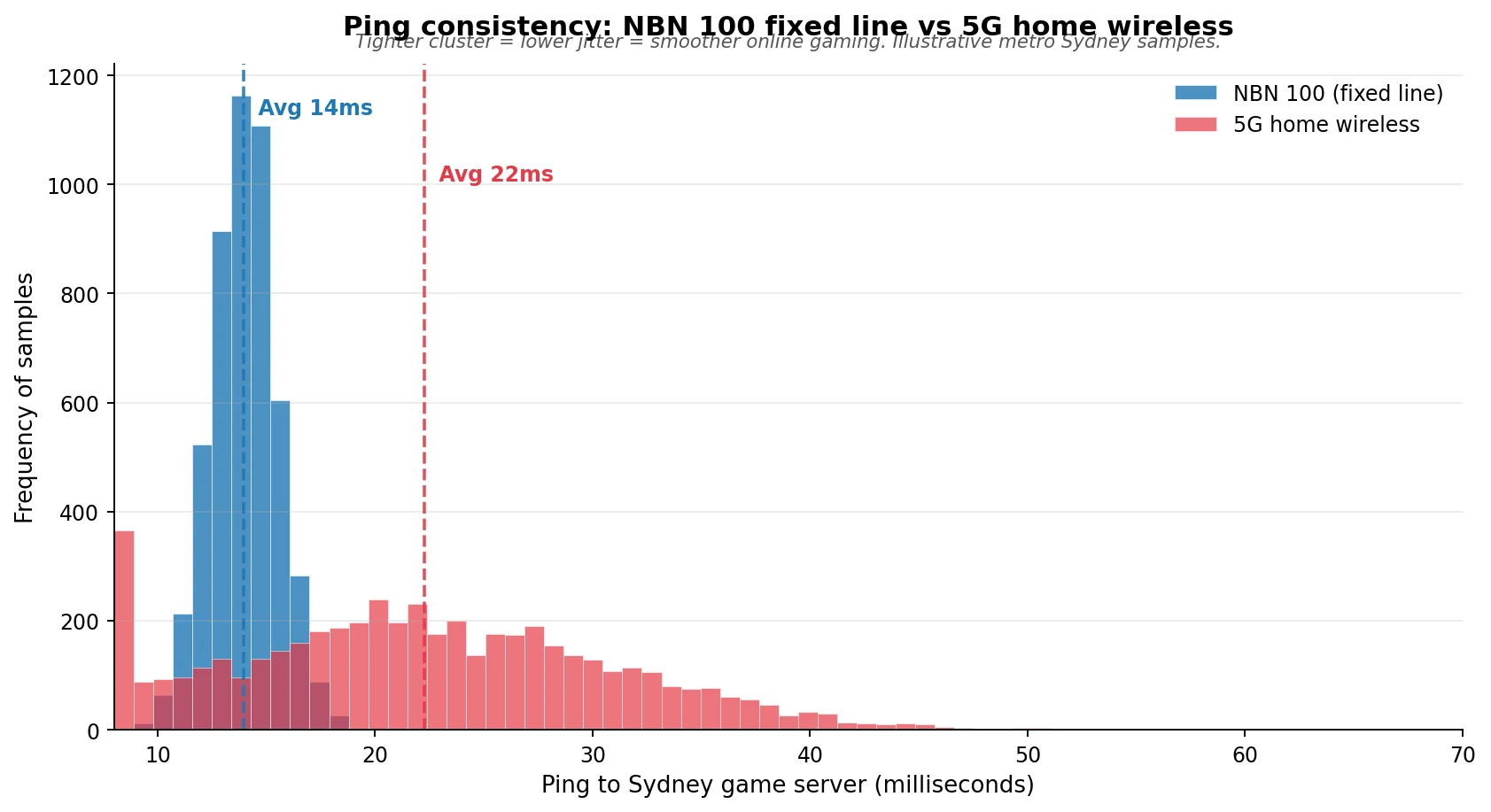
Two connections might look the same on a speed test. Both download fast, both show a reasonable ping. But the spread of pings over a long gaming session. That’s the part that decides whether your shots register and whether your character rubber bands across the map. 5G’s wireless link adds a layer of variability that fixed line just doesn’t have.
There’s a Reddit thread (paraphrased here because the specifics keep getting deleted) where a Telstra 5G home internet user in Melbourne talks about loving the connection for Netflix and work, but having to switch to a 4G modem on a separate tower whenever he plays Apex Legends, because his preferred 5G tower was just busy enough at peak hour that his ping would swing between 18ms and 90ms inside a single match. NBN HFC at the same house was rock solid at 17ms +/- 2ms. He kept the 5G as a backup but stayed with NBN for ranked play.
That’s the typical real world story. 5G is fine until it isn’t, and when it isn’t it’s at the worst possible moment.
By game type: which one wins
Competitive FPS, MOBA, battle royale
Counter-Strike 2, Valorant, Apex Legends, League of Legends, Dota 2, Fortnite ranked, Warzone, PUBG. If you’re competitive in any of these, NBN wins. The reason is jitter. Competitive shooters and MOBAs send tiny packets to the server constantly, between 64 and 128 times per second, and the engine smooths over small ping variations, but only up to a point. Once your jitter exceeds about 10ms, the server’s prediction starts breaking down and you’ll notice missed shots, late ability animations, and rubber banding.
MMOs and RPGs
Final Fantasy XIV, World of Warcraft, Guild Wars 2, FFXI for the diehards. MMOs are more tolerant of higher ping than competitive shooters, 80ms in WoW isn’t a problem, but they punish instability. A disconnect mid-raid is a serious problem socially and mechanically. Fixed-line NBN wins here on stability, not on raw ping.
Console online (PS5, Xbox Series, Switch)
For the actual online play, both connections work. Call of Duty Modern Warfare III is happy on either. The real reason console gamers should pick NBN is the downloads. A modern AAA game update is routinely 50–100 GB. Call of Duty famously hits 150 GB. Some 5G home plans are unlimited, but many mobile tethered 5G setups still have data caps in the hundreds of gigs. You’ll burn through that in a single weekend of patch days.
Plus, console multiplayer favours stability. PS5 Remote Play and Xbox Cloud Gaming feel meaningfully better on fixed line.
Mobile gaming on a phone
This is the one place 5G clearly wins. Genshin Impact, PUBG Mobile, Call of Duty Mobile, Mobile Legends, Pokemon Unite. These games are designed for mobile networks. They’re more forgiving of jitter and they expect you to be on cellular. If you mostly play on your phone, 5G is what you want. There’s no equivalent question on NBN because you’re not at home using your home connection anyway.
Cloud gaming (GeForce NOW, Xbox Cloud Gaming, PlayStation Plus Premium streaming)
Cloud gaming is the worst case for 5G. It needs both high bandwidth and low jitter at the same time. You’re streaming a video of your game from a remote server while sending input back to that server in real time. Any swing in latency stutters the video and adds visible input lag. NBN 100 on FTTP is the gold standard for this. NBN 50 also works well. 5G home wireless can do it on a good day but tends to chop during peak hours.
When 5G is genuinely the better pick for gamers
Not everyone has access to a great fixed-line connection. Some scenarios where 5G home wireless is a sensible call for a gamer:
- You’re stuck on FTTN that maxes out at 25 Mbps. If your FTTN line is poor and you can’t get the free FTTP upgrade yet, a strong 5G signal will often outperform it. Run an Optus or Telstra 5G coverage check at your address before signing up.
- You rent and your landlord won’t approve an NBN install. 5G home wireless plugs into a power point. No drilling, no install fees, no waiting. We covered this in detail in the best internet for renters piece.
- You move a lot. Students, shift workers, anyone who moves once a year. 5G home wireless follows you to the new address. NBN doesn’t.
- You play casually, not competitively. If your main gaming is co-op Fortnite on the weekend with mates and the occasional hour of FIFA, 5G is fine. The jitter problem only really shows up when you’re playing ranked or trying to time things to the millisecond.
- You’re testing it as a backup. Some serious gamers run 5G alongside NBN as a failover — when the fixed line drops out, they swap. Aussie Broadband and a few others sell modems that do this automatically.
Even in these scenarios, get a 14-day or 30-day trial if the provider offers one. Test the actual connection at the hour you usually play. A 5G connection that’s perfect at 11am can fall apart at 8pm when everyone else on the same tower comes home and starts streaming.
Verdict
For the gamer who reads articles like this one, fixed-line NBN is still the answer. NBN 50 on FTTP, FTTC or HFC will give you the consistent, low-jitter connection that competitive online gaming actually rewards. NBN 100 if your household has more than a couple of people online at the same time.
5G home wireless is a good plan B. It’s a good plan A only if your fixed-line situation is genuinely poor or you’re somewhere temporary. Mobile 5G is for phone gaming. The marketing claims about 1ms latency are theoretical and have nothing to do with the actual experience of playing online from a Melbourne suburb.
If you want to test your current connection’s gaming readiness, run a quick speed test. Pay more attention to the ping number than the download speed. Then pick a plan from the live table further up the page that lifts you out of whatever’s currently bottlenecking you.
Frequently asked questions
Is 5G better than NBN for gaming?
For most gamers, no. NBN on a fixed-line connection (FTTP, HFC or FTTC) delivers more consistent ping and lower jitter, which is what gaming actually rewards. 5G can show a similar average ping in a speed test but its wireless link adds variability that you feel as lag spikes during play. The exception is mobile gaming on a phone. There 5G is the right answer.
What’s a good ping for online gaming?
Anything under 20ms is excellent. 20–50ms is good and what most NBN gamers see to local servers. 50–100ms is playable but you’ll start to feel it in competitive shooters. Above 100ms and you’re at a real disadvantage in anything fast-paced. Most Australian gamers on FTTP get 10–15ms to Sydney game servers.
Does 5G really have 1ms latency?
Not in your living room, no. The 1ms figure refers to the theoretical air interface latency between your device and the cell tower in a lab. The actual round trip from your home to a game server runs through routing equipment, the provider’s core network, and the wider internet, and ends up around 20–30ms on a good 5G connection in metro Australia. That’s similar to a decent NBN connection.
Will I get faster downloads on 5G or NBN?
For sustained downloads, NBN 100 (or NBN 250/1000 if you have it) typically beats 5G home wireless by a clear margin and stays consistent across the day. 5G has higher peaks on a good signal but the speed drops off when the tower is congested. For game updates and patches, fixed line is more predictable.
Is NBN Fixed Wireless okay for gaming?
NBN Fixed Wireless (the connection used for some regional areas) is the most wireless flavour of NBN. It connects your home to an NBN antenna on a nearby tower. Ping is usually 20–40ms which is fine for most games, but it does have more jitter than a fixed-line NBN connection. It’s playable for casual gaming and most non-competitive titles, but if you play ranked competitive games seriously, look at whether NBN FTTP, HFC, FTTC or even a strong 5G signal is also available at your address before locking in.
Can I use 5G as a gaming backup for my NBN?
Yes. A few providers, Aussie Broadband is the main one, sell a “smart modem” with a 4G or 5G SIM built in. When your NBN drops out, the modem falls back to the cellular network automatically and your gaming session keeps going. It’s not free (the SIM adds to your monthly bill) but for gamers who lose money to dropouts at the wrong moment, it’s a sensible backup.
Is Telstra 5G better than Optus 5G for gaming?
It depends entirely on which tower covers your address. Telstra has wider 5G coverage nationally, 89% of the population at last count, but Optus tends to be competitive in metro areas and is often cheaper. The variable that matters most for gaming is how close you are to a tower with a strong, uncongested signal, not which network sells the SIM. Check coverage at your exact address on both providers’ sites and, where possible, get a trial.
What’s the best NBN speed tier for gaming?
NBN 50 is enough for one or two gamers in a household. NBN 100 is the sweet spot for a household where multiple people are online at the same time and someone is streaming video while someone else is gaming. NBN 250 or NBN 1000 doesn’t make your games feel faster. The bottleneck stops being your line speed at NBN 100. Higher tiers help with simultaneous big downloads and 4K streaming, not with gaming responsiveness.
Does Starlink work for gaming?
Surprisingly well. Starlink’s low-orbit satellites give a ping of around 25–45ms in Australia which is far better than Sky Muster’s 600ms+ and competitive with NBN Fixed Wireless. It’s a real option for rural gamers who can’t get fixed-line NBN. We’ve gone deep on this in the Starlink vs Sky Muster comparison.
If I want to switch from 5G to NBN (or the other way), how do I do it?
If you’re moving from 5G to NBN, you need to order an NBN plan first, wait for it to activate (typically same-day to a couple of weeks depending on your connection type), then cancel the 5G plan once you’ve confirmed the NBN is stable. Going the other way is faster, 5G plugs into the wall and works the same day. The full process is on our how to switch NBN providers page.