Last updated: 17 May 2026
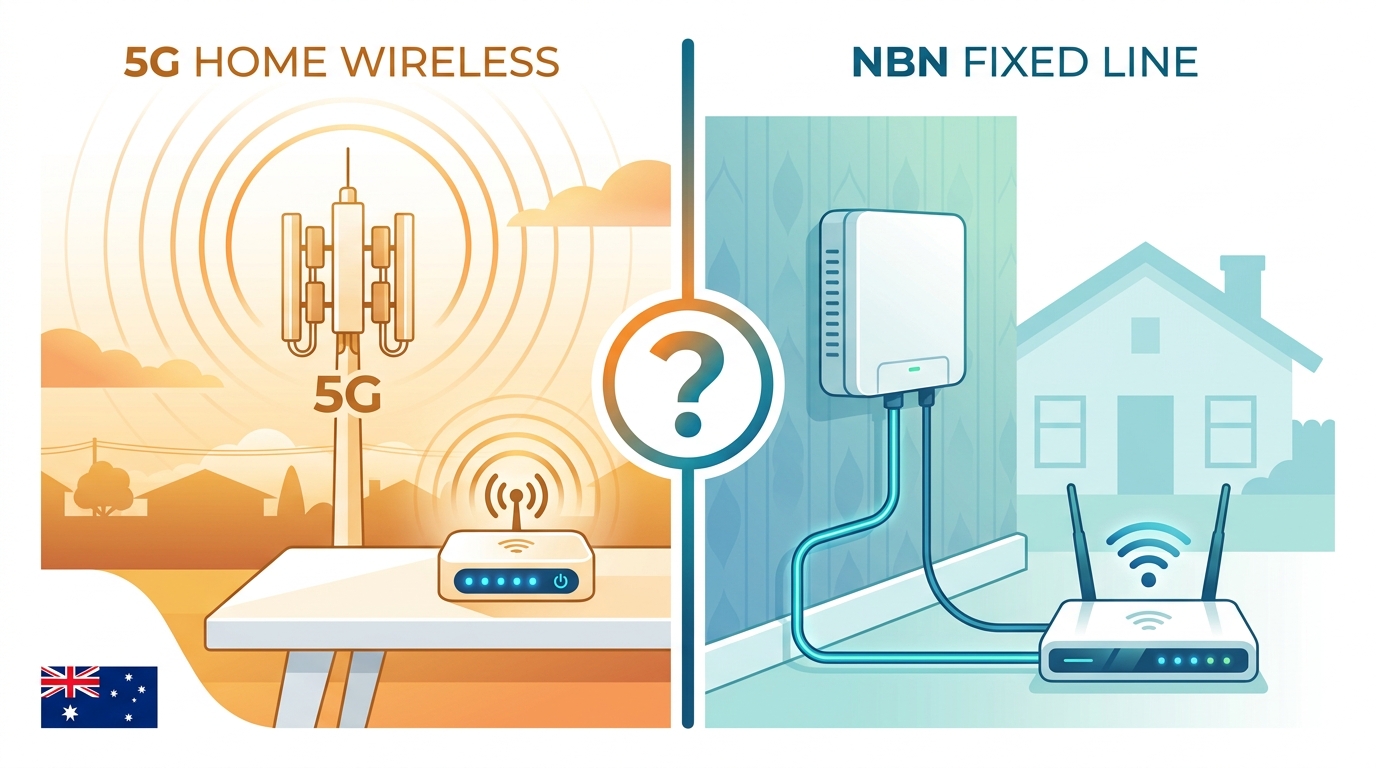
5G home wireless has gone from a curiosity in 2021 to a real alternative to the NBN in 2026. Telstra, Optus, TPG and Vodafone all sell it now, the speeds are competitive, and you don’t need a technician to install it. So the obvious question, and the one we get asked all the time: should you switch?
The honest answer is “it depends, and here’s how to work it out”. This article walks through the real comparison, price, speed, latency, contract terms, who it’s good for, and ends with a decision tree you can actually use.
What is home wireless broadband?
Home wireless broadband is internet delivered through the mobile network (4G or 5G) to a modem sitting in your house. The modem connects to the nearest mobile tower, just like your phone does, and then broadcasts Wi-Fi inside your home. There’s no NBN box, no fibre to the premises, no copper wires from the street. The whole connection rides on the same towers that handle mobile phone traffic.
The 5G version is the one most people are interested in. 5G towers can deliver speeds that beat most NBN plans on paper. The 4G version is still around and is often cheaper, but it’s slower and is mostly bought by people without 5G coverage. The major providers, Telstra, Optus, TPG, Vodafone, all sell both flavours, and a handful of smaller MVNOs resell capacity on those networks.
Side-by-side comparison
| NBN (typical) | 5G home wireless | |
|---|---|---|
| Monthly price | $55 – $130 | $59 – $99 |
| Advertised max speed | 25 – 2000 Mbps | 50 Mbps – 1 Gbps |
| Real evening speed | 85-95% of max | 40-80% of max, varies by tower load |
| Latency | 5-15 ms | 15-30 ms |
| Data | Unlimited on most plans | Unlimited on most plans |
| Install | Sometimes needs technician, 1-3 weeks | Self install, same day |
| Contract | Month to month standard | Month to month standard |
| Portability | Stays at the address | You can move the modem with you |
| Coverage | Almost everywhere | 5G is metro and major regional, expanding |
Speed in the real world
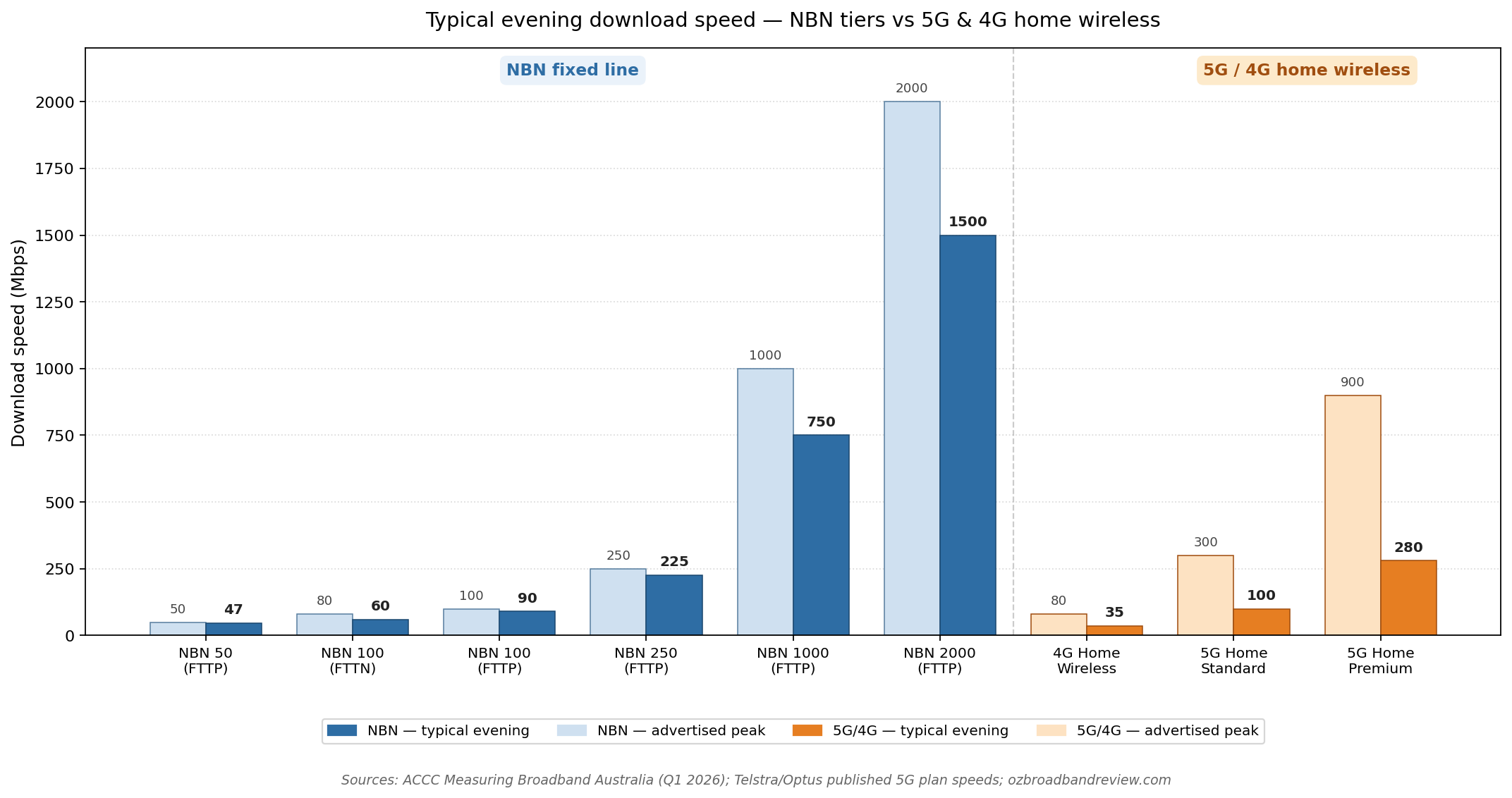
Advertised speeds and real speeds are two different things, and 5G is the technology where the gap is biggest. Marketing material talks about peak speeds. What the network can do at 3am with one user connected to a tower a hundred metres away. That’s not what you get on a Wednesday at 8pm when half the suburb is streaming Netflix.
The chart below shows typical evening speeds (8-11pm) for the common NBN tiers (from NBN 50 right up to NBN 2000) alongside the main 4G and 5G home wireless plans, based on the ACCC’s quarterly Measuring Broadband Australia report and provider self-disclosure. NBN is more predictable. 5G is faster on its best days but more variable. And once you compare against NBN 1000 or NBN 2000 on full fibre, even the fastest 5G home wireless plan is comfortably behind.
Where 5G home wireless wins
- No installation. Pull the modem out of the box, plug it in, wait for the lights to turn green. Most people are online within 15 minutes of unboxing.
- Portability. Moving house? Take the modem with you. As long as the new place has coverage, it just works.
- Cheaper at the entry level. Optus and Telstra 5G plans start at around $59, which beats most equivalent NBN 50 plans from the same providers.
- No copper, no FTTN limits. If you’re stuck on a bad FTTN line getting 25 Mbps when you’re paying for 50, 5G is often a step up — sometimes a huge one.
- Renters and short stays. No landlord paperwork, no installation visit, no commitment beyond a month.
Where NBN still wins
- Consistency. A good NBN connection delivers the same speed at 8pm as it does at 8am. 5G can drop 50% during peak hours on a busy tower.
- Latency for gaming. NBN sits at 5-15 ms. 5G home wireless typically sits at 15-30 ms, sometimes more. If you play competitive online games it’s a meaningful gap. We have a dedicated NBN plans for gaming guide that covers this in detail.
- Predictability of upload. NBN gives you what you pay for on upload. 5G upload can be 10-30 Mbps even on plans advertising “up to 50”.
- No weather effects. Rain and thunderstorms don’t change your NBN speed. They can knock 20-50% off a 5G connection that’s far from a tower.
- Best for households with heavy concurrent use. Four people streaming, gaming and on video calls at once is more reliable on a fixed-line NBN connection.
How to decide
Here’s the decision tree. Five quick questions, and the path you take depends on coverage at your address, what NBN tech you’ve got, whether your current NBN is actually delivering the speed you’re paying for, whether you do anything that needs ultra low latency (gaming, video calls), and whether you’re likely to be at this address long enough that an installation is worth the hassle.

What people who switched are saying
The most common Reddit and Whirlpool story we see goes like this: “I was on FTTN getting 25 Mbps. Switched to Optus 5G and now get 400-900 Mbps. Won’t be going back.” That’s not an exaggeration. One user reported jumping from 28 Mbps NBN FTTN to 931 Mbps on Optus 5G after switching. If you’re on a bad FTTN line, 5G genuinely is life changing.
The other story we see, less often but worth flagging: a Telstra 5G user gets 500-700 Mbps for the first few months, then their tower gets more subscribers and speeds drop to 100 Mbps in evening peak. The 5G plans are uncapped on data but they’re capped on tower capacity. When the tower fills up, everyone slows down. In a few cases users have had ongoing problems and Telstra has actually asked them to switch back to NBN.
For balance, a third story: a user on a good FTTP NBN 100 connection switched to 5G to save $15/month, found the variability annoying for video calls, and switched back. NBN 100 on FTTP is hard to beat for consistency.
Current 5G home wireless plans

|
100GB
100 Mb/s
Unlimited data
|
$34.9/mth | Go to site |

|
100GB
150 Mb/s
100 GB data
|
$40/mth | Go to site |
|
|
200GB
250 Mb/s
Unlimited data
|
$49.9/mth | Go to site |
|
|
200GB
250 Mb/s
200 GB data
|
$55/mth | Go to site |
|
|
400GB
250 Mb/s
Unlimited data
|
$64.9/mth | Go to site |
| Click here to view more wireless 4G and 5G plans | |||
Current NBN plans for comparison
These NBN plans are fast, have plenty of data and all receive excellent reviews from our members. They would be great plans for anyone wanting to work from home.

|
Everyday
25 Mb/s
Unlimited data
|
$78/mth | Go to site |

|
One Plan
500 Mb/s
Unlimited data
|
$80/mth | Go to site |

|
Basic Plus - nbn 25/10
25 Mb/s
Unlimited data
|
$83/mth | Go to site |
|
|
Extra Value
50 Mb/s
Unlimited data
|
$89/mth | Go to site |
|
|
Fixed Wireless Plus
80 Mb/s
Unlimited data
|
$92/mth | Go to site |
| Click here to view more great value NBN internet plans for working from home | |||
Frequently asked questions
Is 5G home wireless cheaper than NBN?
Roughly the same once you compare equivalent plans. 5G plans usually start around $59/month from Optus and Telstra, which is cheaper than equivalent NBN 100 plans from the same providers (about $95-105/month). However, smaller NBN providers like Tangerine and Exetel sell NBN 50 for around $65-75/month, so the price gap closes when you compare 5G to those.
Can I take 5G home wireless with me when I move?
Yes. As long as the new address has 5G coverage from your provider, you just unplug the modem and take it with you. No transfer fee, no waiting for installation. This is one of the biggest practical advantages over the NBN, which stays at the address.
Will 5G replace the NBN?
Not in the short term. 5G home wireless has real limits, tower capacity, weather effects, signal variability, that mean it can’t carry the full Australian internet load. It’s a competitor to the NBN for households where its strengths matter, not a replacement for the entire network. For more on the rollout, see our 5G in Australia guide.
Is 5G home wireless good for gaming?
For casual gaming, yes. For competitive online gaming where every millisecond matters, NBN is the safer choice. 5G latency typically sits 10-15 ms higher than NBN, which is enough to feel in fast-paced shooters. If you mainly play single-player or co-op games, 5G is fine.
What’s the catch with 5G home wireless?
Two things mostly. First, the speed varies, tower congestion, signal strength and weather all affect what you actually get. Second, coverage. 5G is widely available in metro Australia and major regional centres, but isn’t everywhere. Always run the provider’s address checker before signing up. If your address only has 4G coverage, the speeds drop a lot, usually 30-80 Mbps rather than several hundred.
Can I use my own router with 5G home wireless?
It depends on the provider. Most 5G plans include a specific modem (Telstra’s Smart Modem, Optus’s 5G WiFi 6 modem) that’s built to talk to the cellular network. Some let you BYO a compatible cellular modem, but the options are limited compared to NBN where almost any router works. If using your own gear is a hard requirement, the NBN is more flexible.
The bottom line
If you’re stuck on FTTN or FTTB and your real speeds are well below what you’re paying for, switch. The upgrade from 25 Mbps copper to 300+ Mbps 5G is the single best broadband decision a lot of Australians can make right now.
If you’re on a good FTTP or HFC connection and the speed is solid, stay. Consistency beats peak speed for almost every household task, and a stable NBN 100 connection on fibre is hard to beat.
If you’re a renter or moving often, lean towards 5G. The portability is genuinely valuable and you skip the installation hassle. If you’re a heavy gamer or run a serious work from home setup with daily video calls, lean towards NBN.
For a deeper look at the underlying technologies, our 5G in Australia guide covers speeds, coverage and the best home plans. For NBN specific decisions, the how to compare NBN plans guide and the NBN FAQ are the next reads.