Last updated: 22 August 2026
If you’re renting and need internet, the short answer is this: pick 5G home wireless if you’re moving in the next 12 months, NBN if you’re staying longer. Mobile broadband is the third option for very short stays or travel. The rest of this article covers the trade-offs, landlord permission, sharehouse setups, and what to do if you move around a lot.
For the broader question of which internet type suits you (independent of renting), see our NBN vs Broadband vs Wireless hub.
Quick decision table
| Situation | Recommended | Why |
|---|---|---|
| Renting < 12 months | 5G home wireless | No install, take it with you, no landlord involvement |
| Renting 1+ years, NBN-ready property | NBN | Cheaper long term, more consistent speeds |
| Sharehouse, multiple adults | NBN | Better value per person, suits multi-user |
| Moving every few months | Mobile broadband or Starlink Roam | Fully portable |
| Rural rental, no NBN | Starlink or 5G if covered | Sky Muster only as last resort |
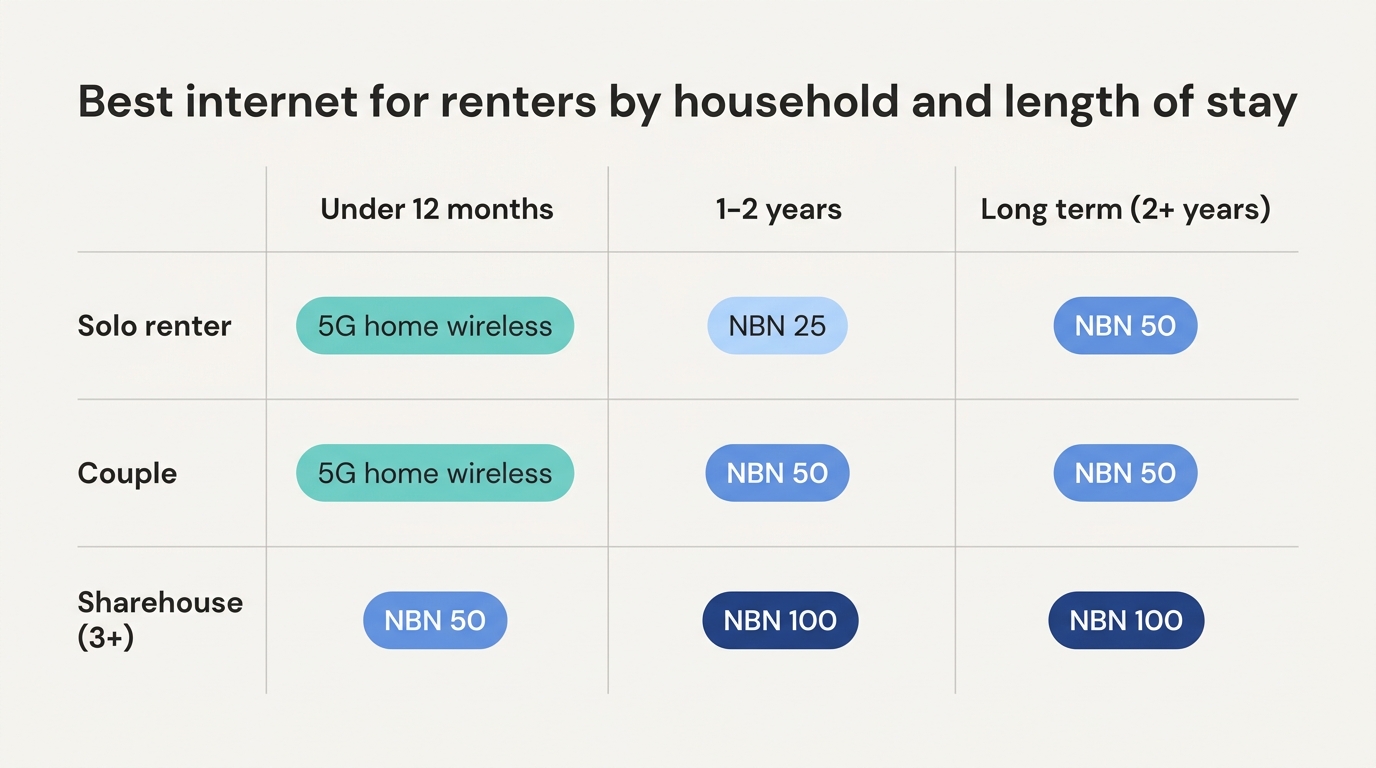
Short term renters (under 12 months)
5G home wireless is the right call. Three reasons:
- No installation. The modem arrives in the mail. Plug it in, online same day. No NBN technician visit, no landlord conversation.
- Take it with you. When you move, pack the modem with the rest of your stuff. New address, same internet.
- No contract trap. Most 5G home plans are month to month with no termination fee.
The catch is coverage. 5G works well in metro Australia but signal varies by exact street and how many neighbours are on the same tower. Most providers offer a 14 or 30 day trial. Take the trial seriously and test it during peak hours (7–11pm) before you commit.
2026 5G home plans typically run $59–$85/month for unlimited data. Telstra, Optus, TPG and Vodafone all offer them. For more, see our 5G internet in Australia guide.
Long term renters (1+ years)
If you’re staying for a year or more, NBN is usually the better choice.
- Cheaper long term. NBN 50 plans start around $70/month with better evening speeds than most 5G plans.
- More consistent. Fixed line NBN doesn’t drop because the local tower is busy or because it rained.
- Better for multi user households. NBN is built for whole home use; 5G can struggle under sustained load.
- No special restrictions for renters. The connection belongs to the property; you just sign up as a customer.
The catch is the activation time (1–5 business days for an NBN-ready property, longer for new connections) and potentially needing landlord permission if the property has never been connected. More on both below.
Sharehouses
Sharehouses have their own dynamics:
Splitting the bill with housemates has its own traps (whose name goes on the account, what happens when someone moves out). We’ve covered all of it in our sharehouse NBN guide.
- Whose name goes on the contract? Usually one person — typically the longest term resident. They’re legally responsible if others stop chipping in.
- What speed do you need? For 3–5 adults all working from home or streaming, NBN 100 ($80–$100/month) is the safe choice. Split between 4 people that’s $20–$25 each — cheap.
- Who pays for the modem? Some providers include one free with a 12 month contract; others charge $99–$200. Worth budgeting upfront.
- What happens if someone moves out? The contract stays with whoever’s name is on it. Make this clear at the start.
Most providers let you switch plans month to month with no penalty, so if your sharehouse changes (one person moves in or out), you can adjust the speed tier without drama.
The no lock-in plans renters actually pick
Almost every NBN plan worth having in 2026 is month to month, which suits renting perfectly: connect when you move in, cancel when the lease ends, no exit fees. The plans below are pulled live from our database, cheapest first. All of them are no lock-in.
If you’d rather start from quality than price, our best NBN plans page ranks the standouts at every speed tier.
Do I need my landlord’s permission for NBN?
Mostly no, sometimes yes. It depends on whether the property is already NBN-ready.
You don’t need permission if:
- The property is already NBN-connected (active). You just sign up with a provider and the connection activates remotely.
- The property is NBN-ready (passive) but the box is already installed. Provider activates remotely, no work needed.
You do need permission if:
- It’s a new build or has never been NBN-connected. The technician needs to install the wall box (the NTD) — this counts as a physical alteration to the property.
- The installation requires running a cable along the building exterior or drilling holes.
In practice, most rental properties in metro Australia are already NBN-ready, so the question doesn’t come up. Check the NBN Co address checker before signing up. Our how to connect to the NBN guide covers the full process.
If a new install is needed, ask the landlord in writing. Most landlords are fine with it. A connected property has higher rental value. Frame it that way if there’s any resistance.
What if I move frequently?
If you’re moving every few months, house sitting, between leases, working remotely from multiple cities, the math changes.
When a move is actually locked in, our moving house with NBN checklist covers the two week countdown, and students should look at the uni student NBN guide for bill splitting and no credit history workarounds.
Mobile broadband is the most flexible option. Telstra, Optus and Vodafone all sell SIM based modems with monthly plans from around $30/month for 100GB. Capped data, no install, fits in a backpack. Good for one user.
5G home wireless can move with you too, but you’ll need to update your address with the provider and sometimes wait for re-provisioning. Still much easier than NBN.
Starlink Roam is the option for travelling around regional Australia or anywhere with patchy mobile coverage. ~$199/month plus the $599 hardware. Overkill for someone hopping between Sydney suburbs, but the right call for a caravan or remote work setup.
Rural rentals
If you’re renting a property in regional or remote Australia, your options narrow:
- 5G if the property is in a 5G coverage area (check Telstra/Optus/Vodafone coverage maps for the address)
- Starlink if Sky Muster is the only NBN option (which it often is in remote areas). Hardware is a sunk cost but monthly plans run $75 to $150 depending on speed tier, and the kit is technically portable
- Sky Muster satellite as a last resort. Slow but cheap
Our Starlink vs Sky Muster guide goes into detail on the two satellite options.
What speed do I really need?
The right speed depends on how you use the internet, not on whether you’re renting. Our what speed do I really need guide covers this in detail, but the rough version:
- 1 person, light use: NBN 25 (or a basic 5G plan)
- 1 person on video calls: NBN 50
- 2 people / sharehouse: NBN 50 or 100
- 4+ people with streaming and gaming: NBN 100
Frequently asked questions
Can renters get the NBN?
Yes. The NBN connection belongs to the property, not the tenant. You sign up with any provider as the account holder. If the property is already NBN-connected, activation is just paperwork. If not, you may need landlord permission for the install.
Do I need landlord permission to get the NBN installed?
Only if the property has never been NBN-connected. For already NBN-ready properties (which is most metro Australian rentals in 2026), you just sign up. No landlord involvement needed.
What’s the best internet plan for a sharehouse?
NBN 100 with a provider that has good evening speeds (Aussie Broadband, Superloop, Internode). Split 3–4 ways it’s about $20–$25 per person per month.
Is 5G home internet worth it for renters?
Yes if you’re moving within 12 months or you can’t be bothered with an NBN install. The flexibility is worth the slightly higher cost. For longer stays NBN is usually better value.
Can I take my NBN connection with me when I move?
No. The NBN connection belongs to the property. When you move, you cancel with your provider and sign up again at the new address (or transfer the account to the new address if both are NBN-ready). Your modem usually works at the new place.
What’s the cheapest internet plan for a renter?
For one person on a budget, NBN 25 plans from SpinTel or Tangerine start around $44–$48/month for the first 6 months, then $70–$73 ongoing. For short term, basic 5G home wireless plans start around $59/month. See our 10 cheapest unlimited NBN plans for the current cheapest options.
For the broader internet type decision, start with our NBN vs Broadband vs Wireless hub. For how to choose a plan once you’ve decided on a type, see our how to compare NBN plans and how to choose a broadband plan guides. Or browse plans via our NBN plan finder or wireless plan finder.